


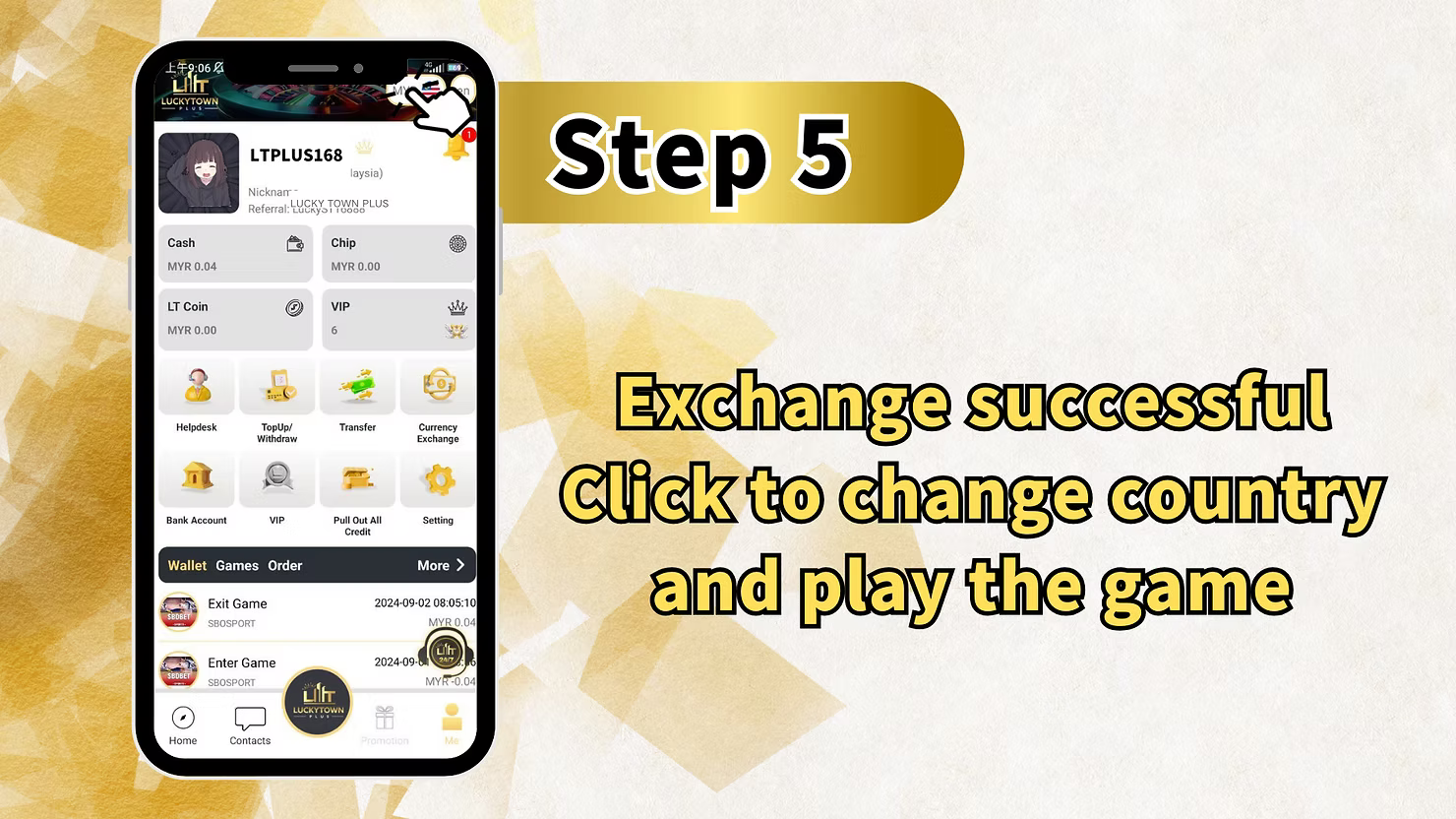
LUCKY TOWN PLUS offers a convenient currency exchange feature that allows you to convert between Malaysian Ringgit (MYR) and Thai Baht (THB). Whether you're planning to play on the Thai version of the platform or simply need to manage your funds in different currencies, our step-by-step guide will walk you through the process. LUCKY TOWN PLUS makes currency exchange simple and transparent.
Step-by-Step Guide to Currency Exchange
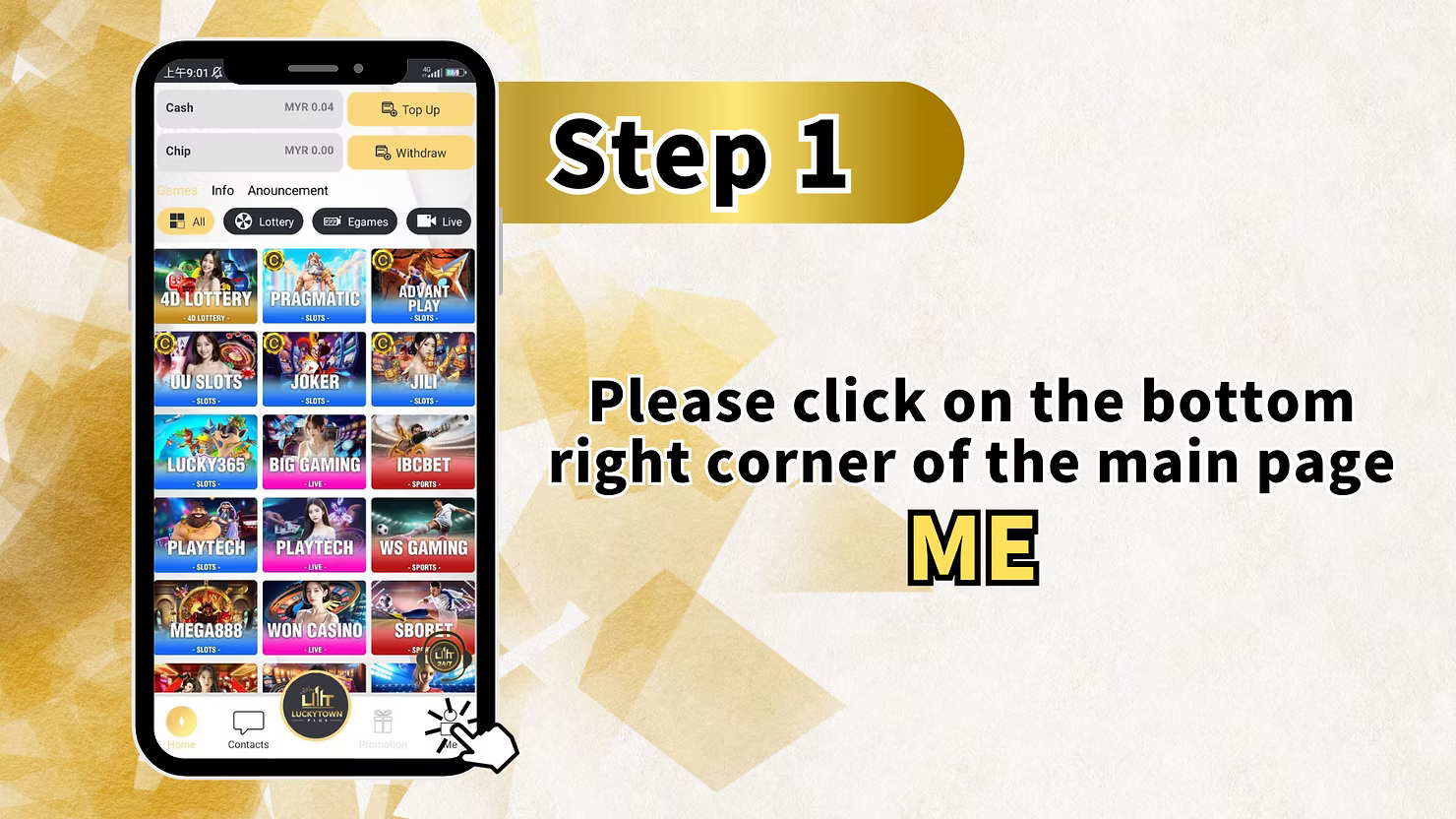
Step 1: Access the "Me" Section
Log in to your LUCKY TOWN PLUS account. On the main page, locate and click the "Me" button in the bottom right corner. This opens your personal dashboard where you can manage your account settings and access financial tools.
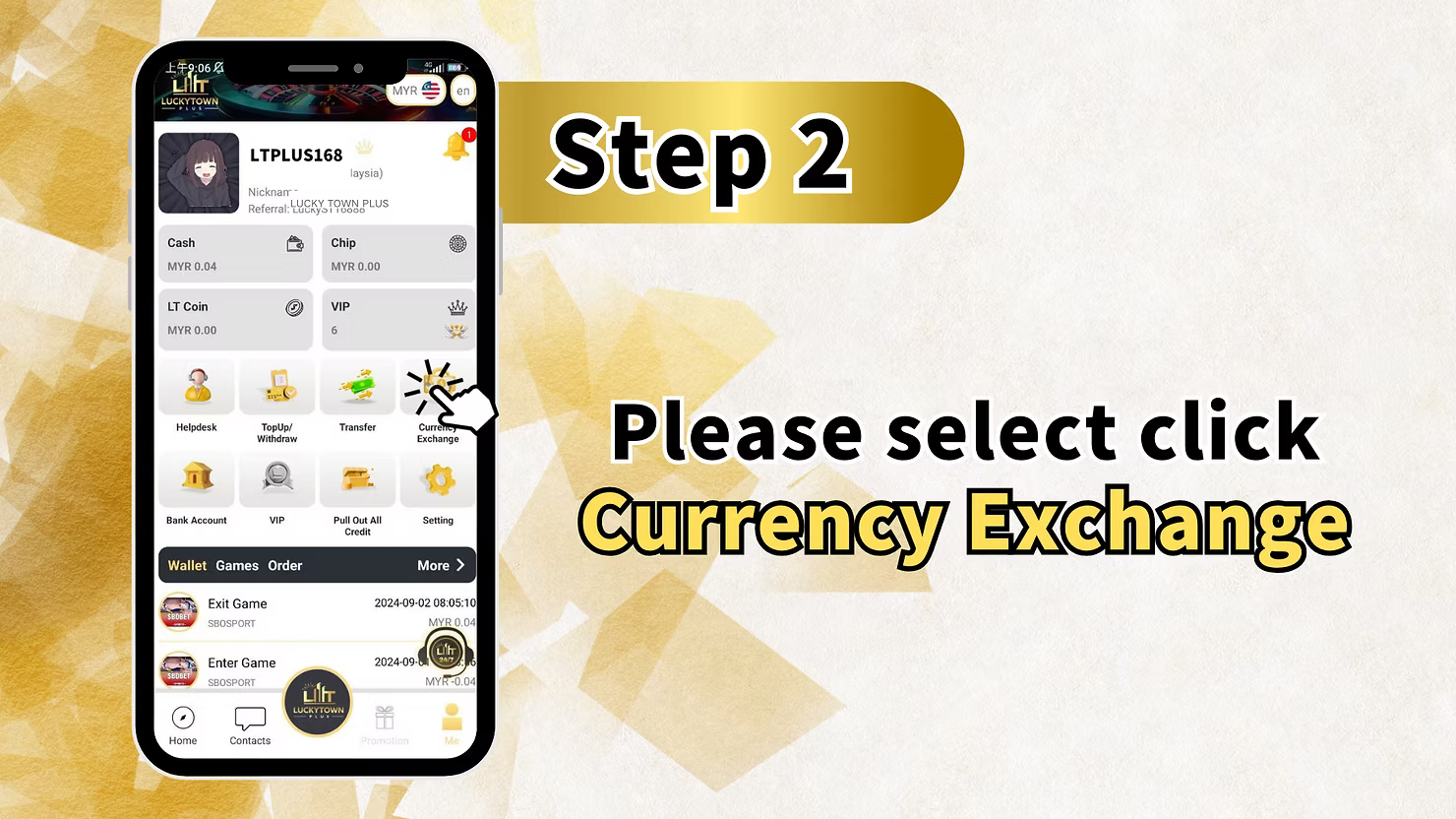
Step 2: Select "Currency Exchange"
From your "Me" dashboard, locate and click on "Currency Exchange". This will take you to the currency exchange interface where you can convert between MYR and THB.
Step 3: Complete the Currency Exchange Form
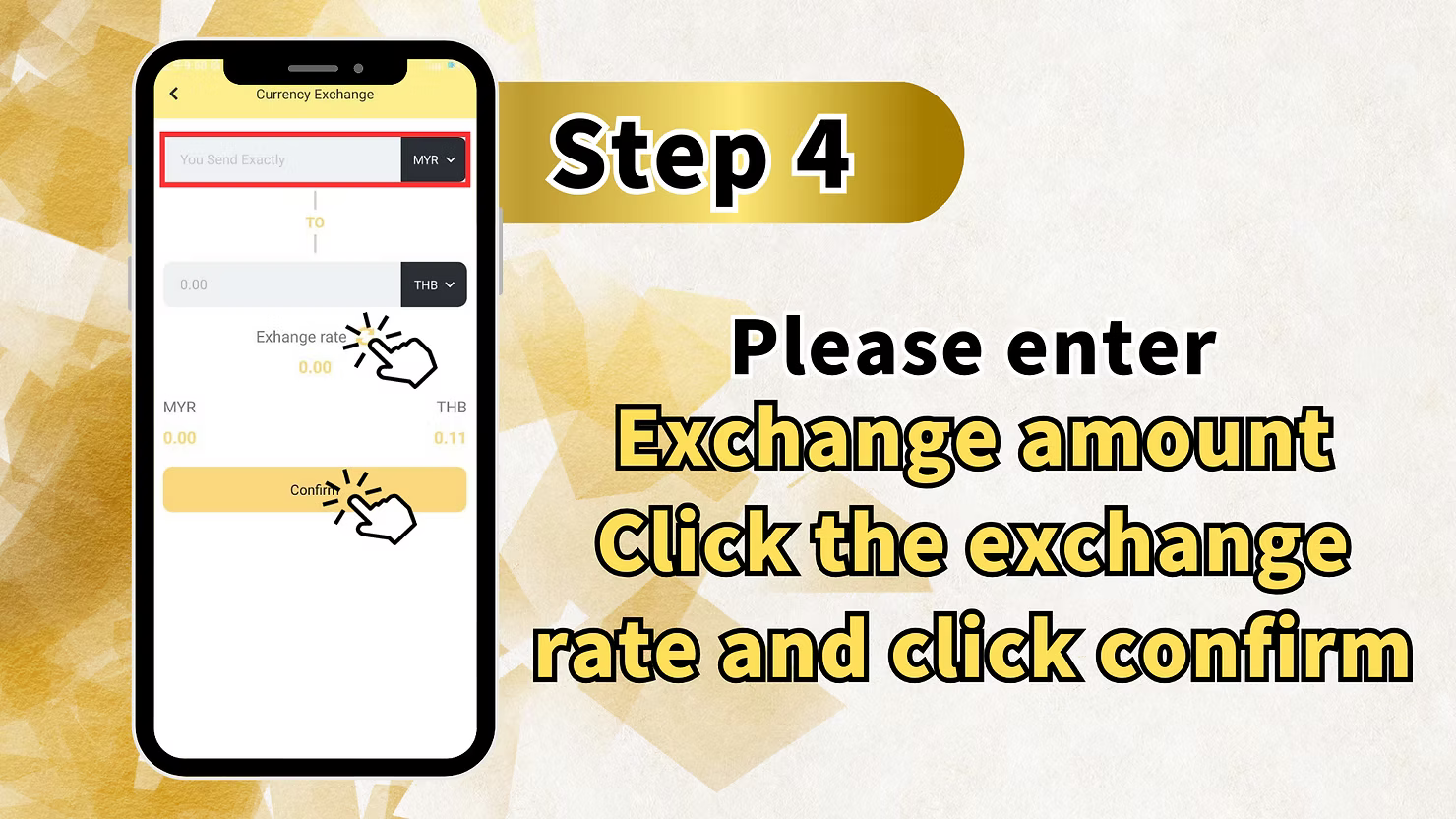
On the Currency Exchange page, you will see a form with the following fields and options:
"You Send Exactly" Field
In this field, enter the amount of currency you wish to convert. The currency is defaulted to MYR (Malaysian Ringgit). Type the amount you want to exchange.
"TO" Currency Selection
The target currency is set to THB (Thai Baht). This is the currency you will receive after conversion. The exchange is always from MYR to THB in this interface.
Exchange Rate Display
The current Exchange rate is displayed between the two currency fields. This shows how many THB you will receive for each MYR. The rate updates in real-time based on market conditions.
Calculated Amount
Below the exchange rate, you will see the calculated amount in THB based on the MYR amount you entered and the current exchange rate. For example, if the rate is 0.00 (placeholder), the calculation will show 0.00 MYR and 0.00 THB until you enter an amount.
Confirm Button
After entering your desired exchange amount and reviewing the rate and calculated amount, click the "Confirm"button to complete the exchange.
Instruction Reminder
The screen includes a helpful reminder: "Please enter Exchange amount Click the exchange rate and click confirm" – This guides you to enter your amount, check the rate, and then confirm.
Important Notes for Currency Exchange
MYR to THB Only in Malaysia Version
The currency exchange feature in the Malaysia version of LUCKY TOWN PLUS is designed for converting MYR to THB. This allows Malaysian players to prepare funds for use in the Thai version of the platform.
THB to MYR Conversion
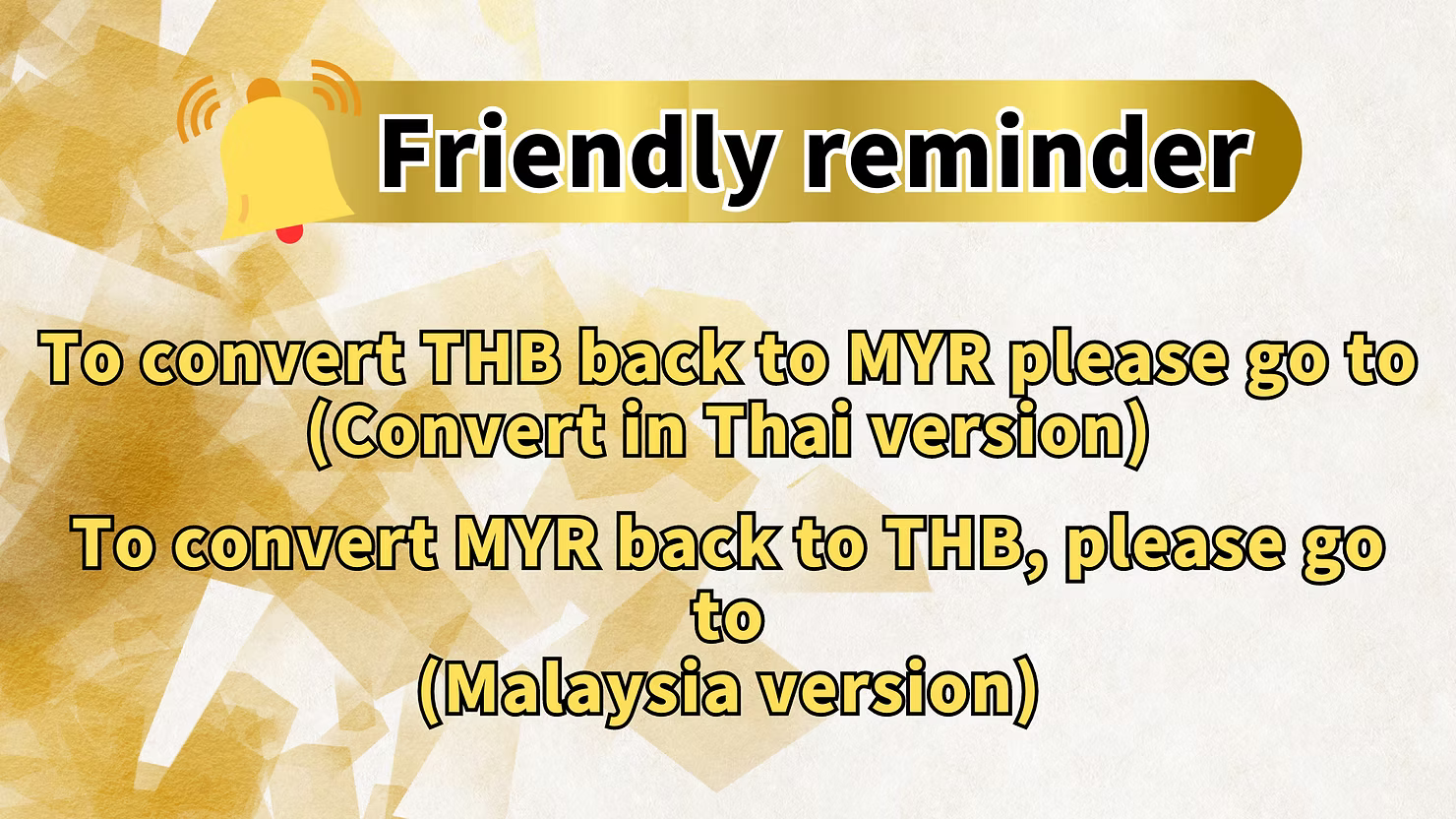
If you need to convert THB back to MYR, you must use the Thai version of LUCKY TOWN PLUS. The friendly reminder clearly states:
Friendly Reminder
"To convert THB back to MYR please go to (Convert in Thai version)" – This means you cannot convert THB to MYR in the Malaysia version. You must switch to the Thai version of the app or website to perform the reverse conversion.
MYR to THB in Malaysia Version
"To convert MYR back to THB, please go to (Malaysia version)" – This confirms that the Malaysia version handles MYR to THB conversions, while the Thai version handles THB to MYR.
Exchange Rate Information
Exchange rates are updated regularly and displayed at the time of transaction. The rate shown is the rate that will apply to your exchange. Rates may fluctuate based on market conditions.
Frequently Asked Questions About Currency Exchange
What Currencies Can I Exchange?
Currently, LUCKY TOWN PLUS supports exchange between Malaysian Ringgit (MYR) and Thai Baht (THB) . Other currency pairs may be added in the future.
Can I Exchange THB to MYR in the Malaysia Version?
No. To convert THB back to MYR, you must use the Thai version of LUCKY TOWN PLUS. The Malaysia version only supports MYR to THB conversion.
How Is the Exchange Rate Determined?
Exchange rates are provided by LUCKY TOWN PLUS based on market rates and may include a small spread. The rate displayed at the time of confirmation is the rate that will apply to your transaction.
Is There a Fee for Currency Exchange?
The interface does not explicitly show fees. Any applicable fees would be reflected in the exchange rate offered. Check the rate carefully before confirming.
How Long Does an Exchange Take?
Currency exchanges on LUCKY TOWN PLUS are typically processed instantly. Once you confirm, the converted funds should be available in your account immediately.
Is There a Minimum Exchange Amount?
The interface does not specify a minimum amount. However, very small exchanges may not be practical due to rate fluctuations. Check with customer service if you have questions about limits.
Can I Exchange Partial Balances?
Yes. You can enter any amount you wish to exchange, up to your available MYR balance.
Why Use Currency Exchange on LUCKY TOWN PLUS?
LUCKY TOWN PLUS provides a seamless currency exchange feature for players who participate in both the Malaysian and Thai versions of the platform. Instead of managing separate accounts or using external exchanges, you can convert your funds instantly within the app. With clear exchange rates, simple 3-step process, and helpful reminders about version switching, LUCKY TOWN PLUS makes multi-currency gaming convenient and hassle-free.
Exchange Currency on LUCKY TOWN PLUS Today
Ready to convert MYR to THB? Follow our 3-step guide to complete your currency exchange instantly. Check the live rate, enter your amount, and confirm. Log in now to access the Currency Exchange feature – or sign up in minutes using your Malaysia phone number if you're not yet a member.
Start Currency Exchange