

LUCKY TOWN PLUS makes it easy to withdraw your winnings quickly and securely. Whether you're cashing out after a big win or simply moving funds to your bank account, our step-by-step guide will walk you through the entire process. LUCKY TOWN PLUS ensures that all withdrawals are processed promptly with robust fraud prevention measures in place.
Step-by-Step Guide to Withdraw Funds
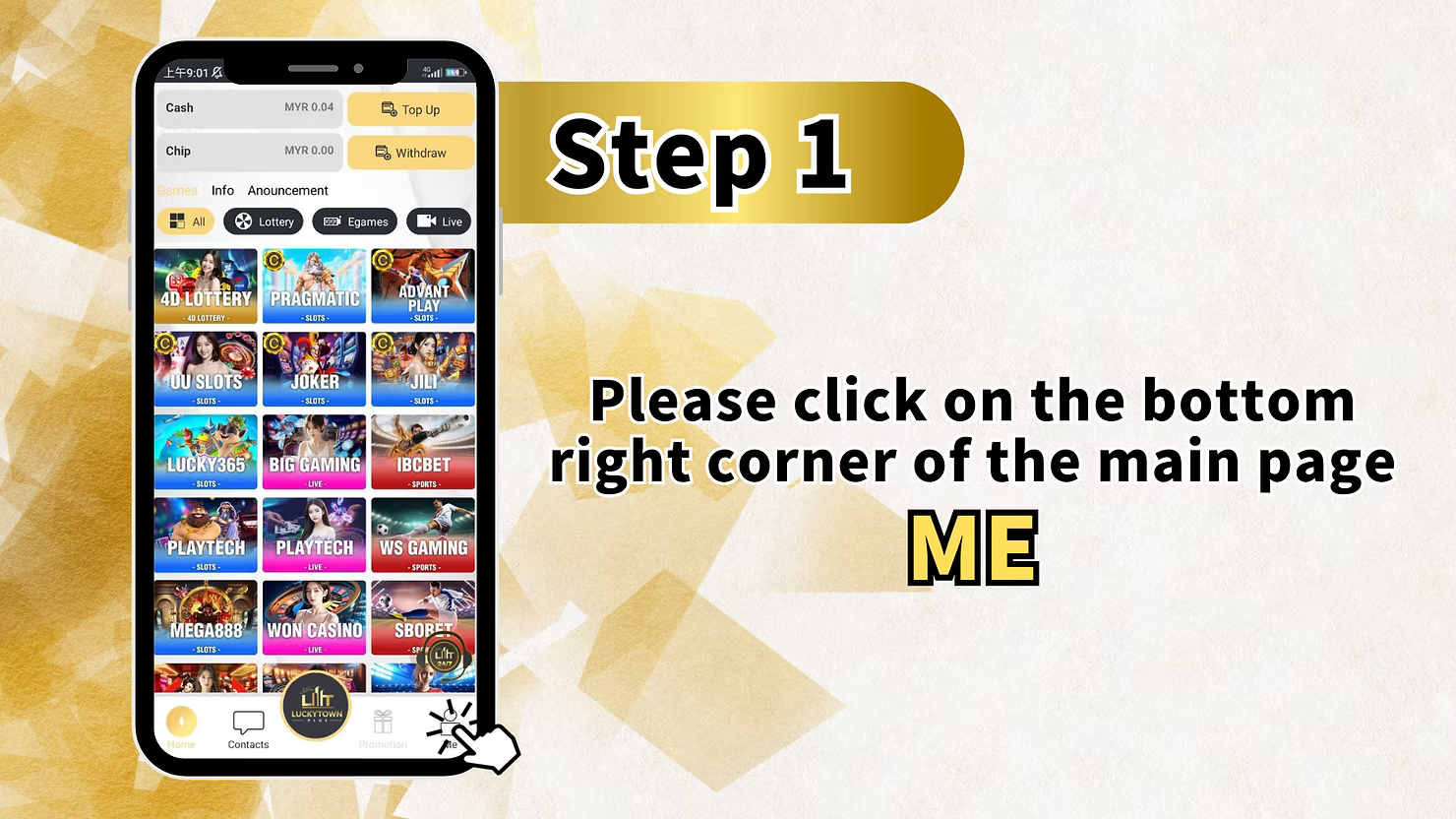
Step 1: Access the "Me" Section
Log in to your LUCKY TOWN PLUS account. On the main page, locate and click the "Me" button in the bottom right corner. This opens your personal dashboard where you can manage your account and access financial transactions.
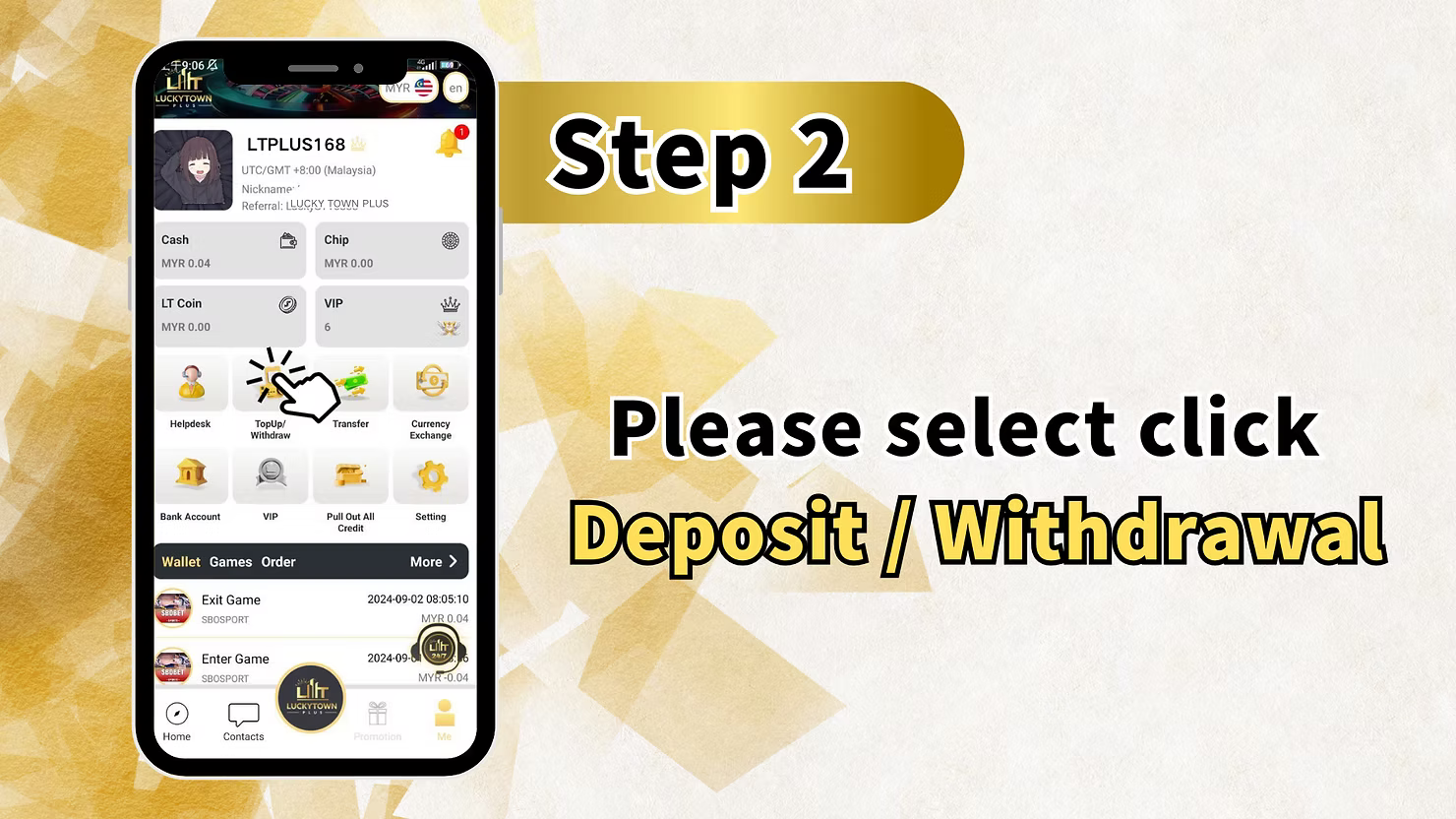
Step 2: Select "Deposit / Withdrawal"
From your "Me" dashboard, locate and click on "Deposit / Withdrawal" (also shown as "Top Up/Withdraw"). This will take you to the main financial transaction page where you can choose between adding funds or withdrawing.
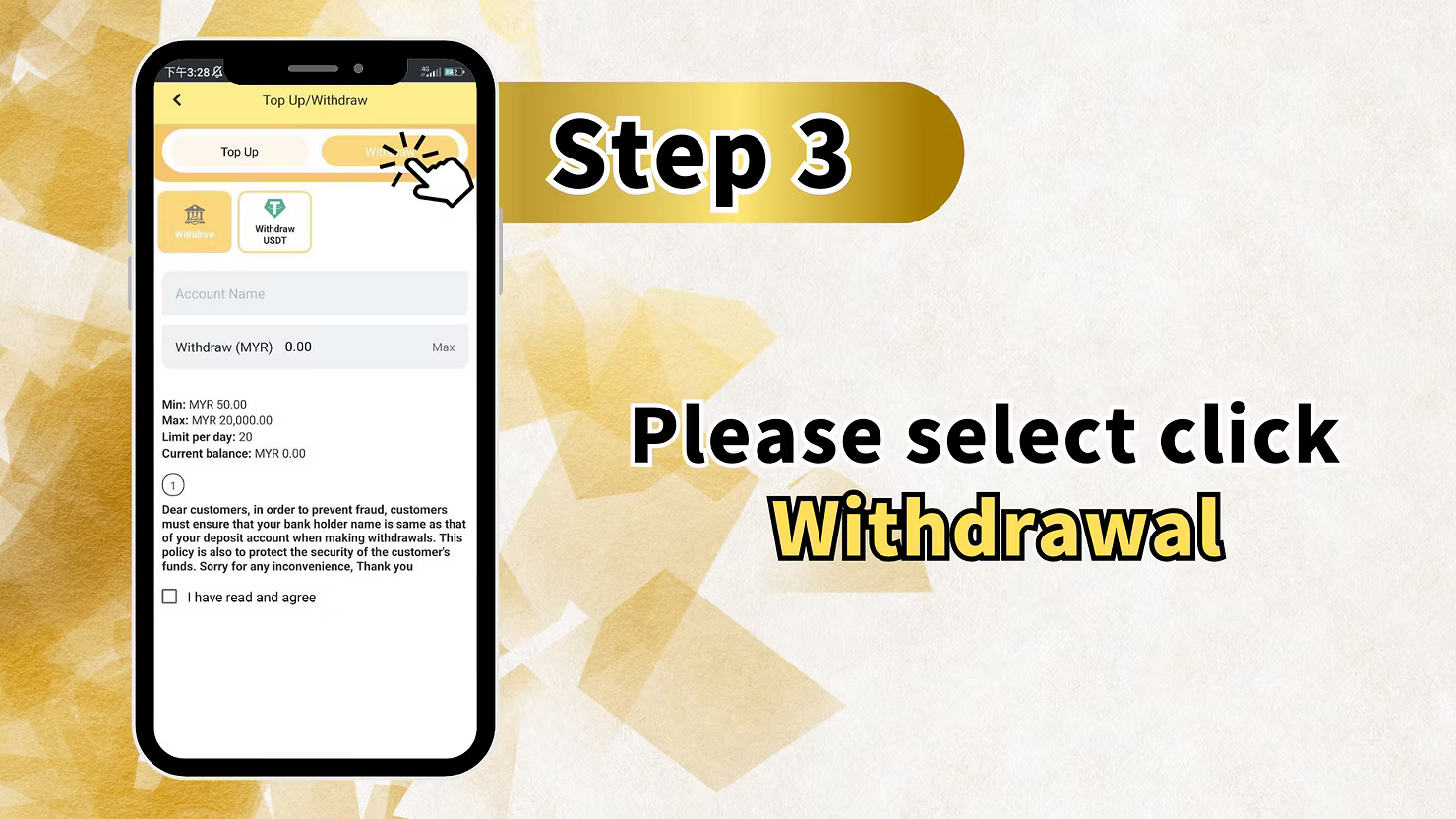
Step 3: Select "Withdrawal" as Your Transaction Type
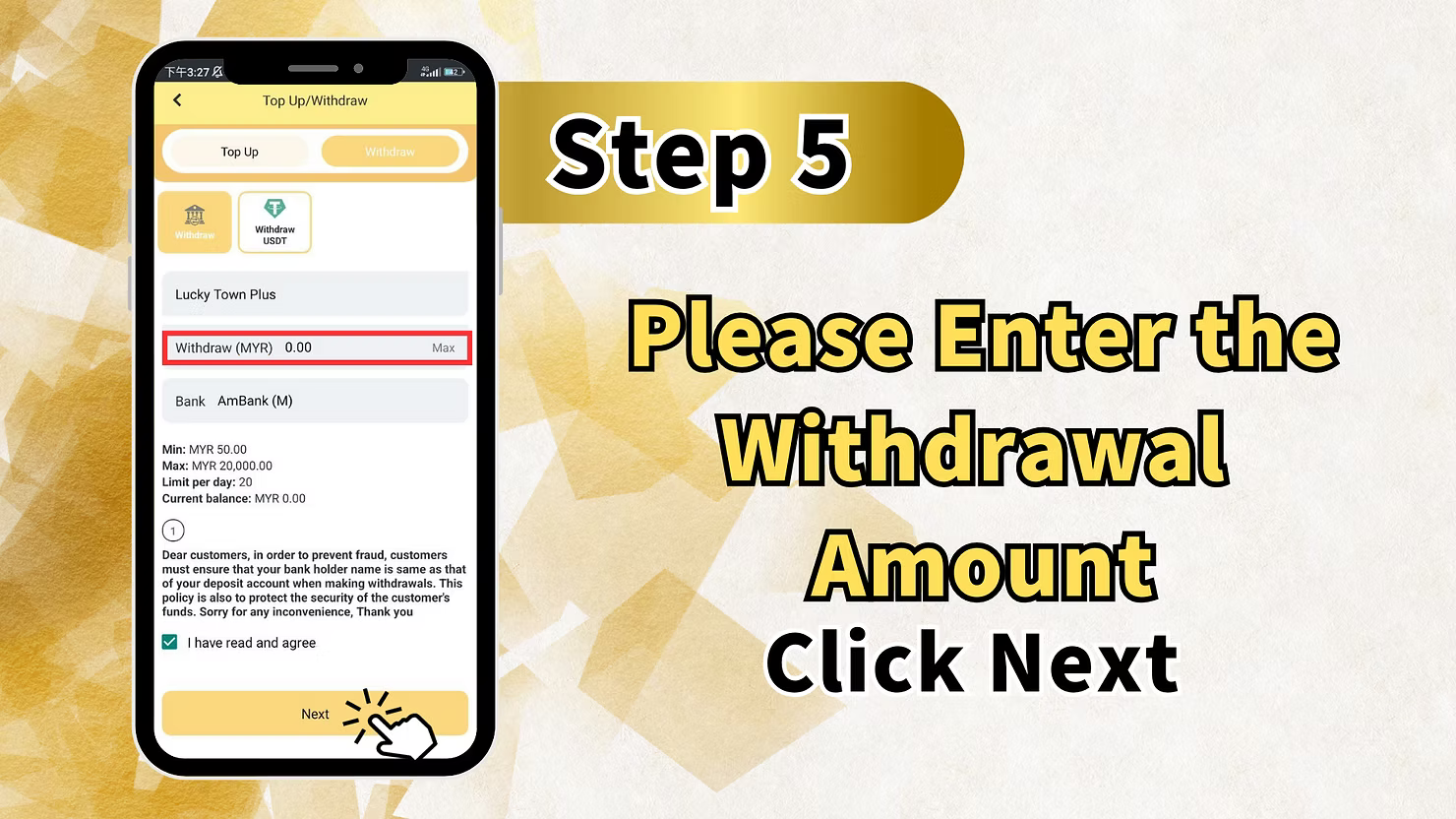
On the Top Up/Withdraw page, you will see two main options: Top Up and Withdraw. Select "Withdraw" to begin the withdrawal process.
Important Fraud Prevention Notice
Before proceeding, you will see the following important notice:
"Dear customers, in order to prevent fraud, customers must ensure that your bank holder name is same as that of your deposit account when making withdrawals. This policy is also to protect the security of the customer's funds. Sorry for any inconvenience, Thank you."
Name Matching Requirement
This means the name on your LUCKY TOWN PLUS account must match the name on your bank account exactly. If you haven't completed Real Name Verification, you may need to do so before withdrawing.
Withdrawal Limits Display
The withdrawal screen displays important limit information:
- Min: MYR 50.00 – Minimum withdrawal amount
- Max: MYR 20,000.00 – Maximum withdrawal per transaction
- Limit per day: 20 – Maximum number of withdrawals allowed per day
- Current balance: Shows your available balance for withdrawal
Agreement Checkbox
You must check the box "I have read and agree" to acknowledge that you understand and accept the fraud prevention policy before proceeding.
Step 4: Select Bank Account and Enter Withdrawal Amount
On the withdrawal screen, you will need to:
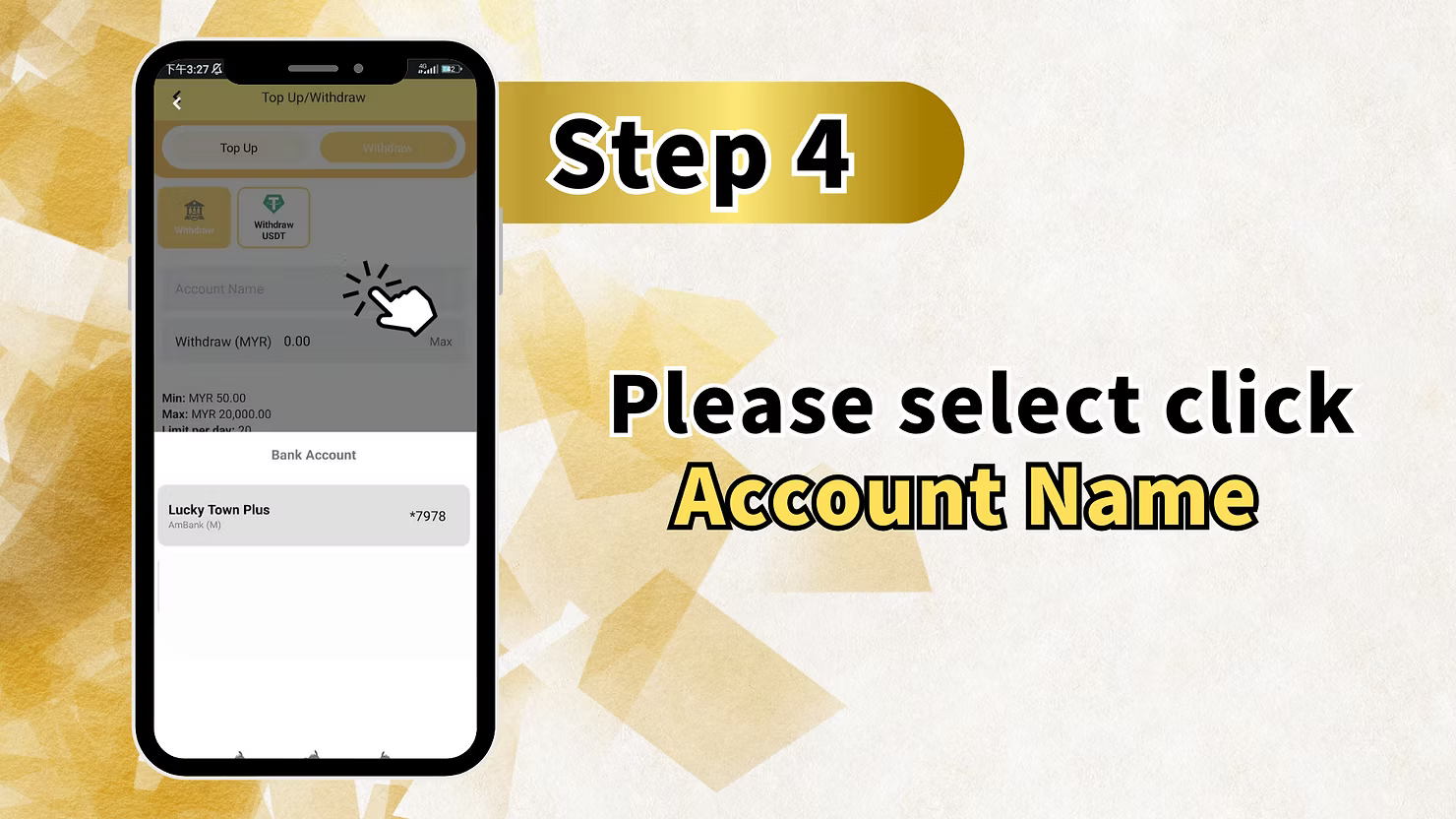
Select Your Bank Account
Click on "Account Name" or the bank account field to select which bank account you want to receive your funds. The system will show your registered bank accounts, for example:
- Lucky Town Plus (account reference)
- Ambank (M) – The bank name
- *7978 – Last four digits of your account number
Enter Withdrawal Amount
In the "Withdraw (MYR)" field, enter the amount you wish to withdraw. You can click "Max" to withdraw your entire available balance, subject to the maximum limit.
Withdrawal Limits Reminder
- Minimum: MYR 50.00
- Maximum: MYR 20,000.00 per transaction
- 1 limit per draw - 99% – Additional limit information
Step 5: Enter Transaction PIN
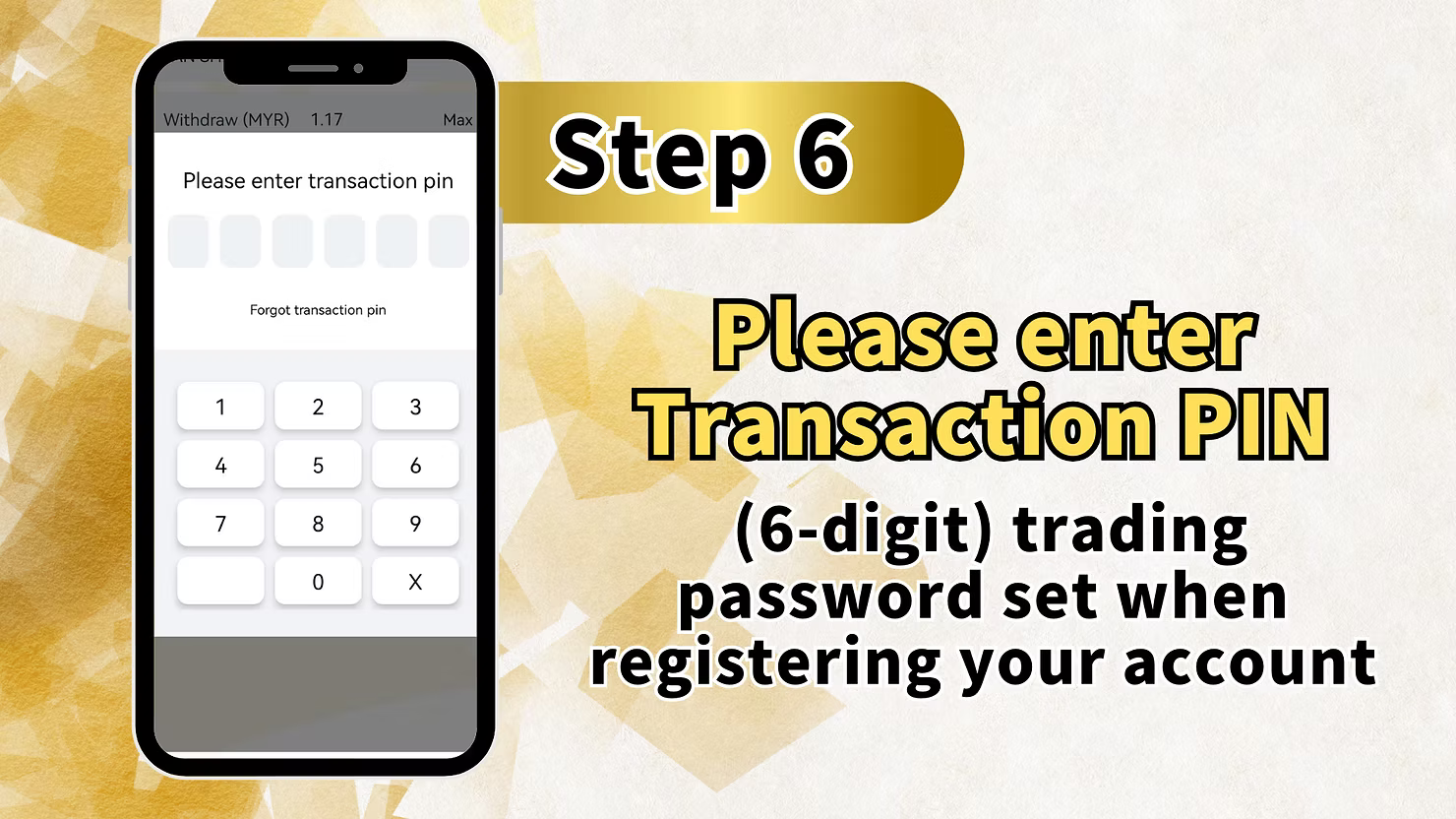
After entering your withdrawal amount, you will be prompted to enter your Transaction PIN.
Transaction PIN Requirements
"Please enter transaction pin (6-digit) trading password set when registering your account." Your transaction PIN is a 6-digit number you created during account registration. This adds an extra layer of security to all withdrawals.
Forgot Transaction PIN?
If you have forgotten your transaction PIN, click the "Forgot transaction pin" link to reset it. You may need to verify your identity through customer service or email verification.
Complete Step 5
After entering your 6-digit transaction PIN, click "Next" or confirm to proceed with the withdrawal request.
Step 6: Withdrawal Submitted – Wait for Processing
After confirming your withdrawal request, you will see a confirmation screen:
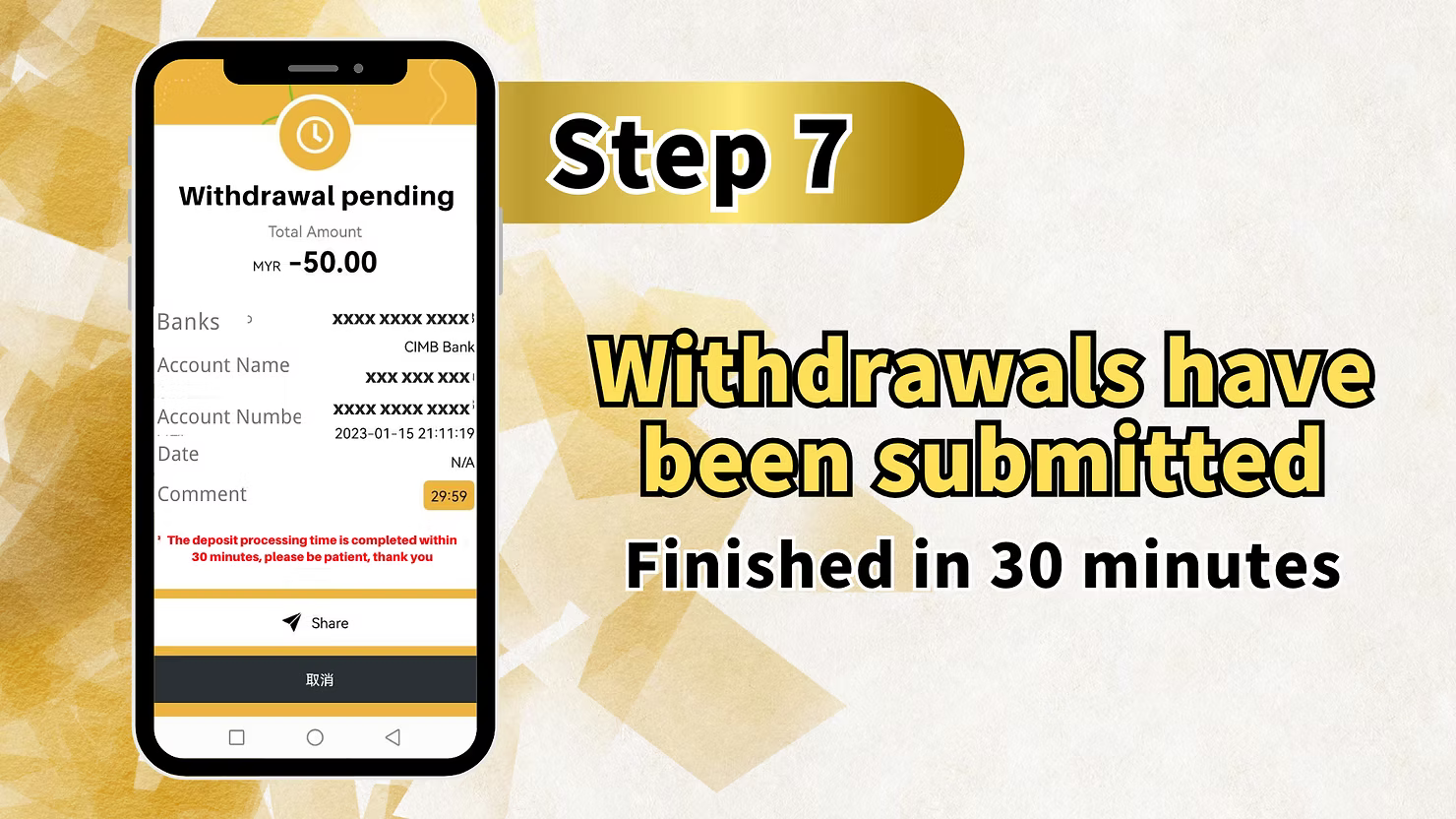
Withdrawal Pending Screen
The screen displays:
- Total Amount: Shows the amount being withdrawn (e.g., MYR -50.00)
- Banks: Masked bank details (XXXXXXXXXXXXX)
- Account Name: Masked account name (XXXXXXXXXXXXX)
- Account Number: Masked account number (XXXXXXXXXXXXX)
- Date: Shows processing time (e.g., 29:59 countdown)
- Comment: Important processing information
Processing Time Information
"The deposit processing time is completed within 30 minutes, please be patient, thank you" – Your withdrawal will be processed within 30 minutes.
Withdrawal Submitted Confirmation
"Withdrawals have been submitted Finished in 30 minutes" – This confirms your withdrawal request has been received and will be completed within 30 minutes.
Important Notes for Withdrawals
Name Matching is Essential
The name on your LUCKY TOWN PLUS account must exactly match the name on your bank account. Any discrepancy will result in withdrawal rejection. Complete Real Name Verification before your first withdrawal to avoid issues.
Withdrawal Limits Summary
- Minimum Withdrawal: RM50.00 per transaction
- Maximum Withdrawal: RM20,000.00 per transaction
- Daily Limit: 20 withdrawals per day
- Current Balance: Always check your available balance before withdrawing
Transaction PIN Security
Your 6-digit transaction PIN is required for every withdrawal. Never share this PIN with anyone. LUCKY TOWN PLUS will never ask for your PIN via phone, email, or message.
Processing Time
Withdrawals are typically processed within 30 minutes of submission. During peak times, it may take slightly longer. You will receive confirmation once the transfer is complete.
Frequently Asked Questions About Withdrawals
What Is the Minimum Withdrawal Amount?
The minimum withdrawal amount on LUCKY TOWN PLUS is RM50.00 per transaction.
What Is the Maximum Withdrawal Amount?
The maximum withdrawal amount per transaction is RM20,000.00. You can make up to 20 withdrawals per day.
How Long Do Withdrawals Take?
Withdrawals are typically processed within 30 minutes of submission. The funds will then be transferred to your bank account, which may take additional time depending on your bank.
Why Do I Need a Transaction PIN?
The transaction PIN adds an extra layer of security to your withdrawals, ensuring that only you can authorize fund transfers from your account.
What If I Forgot My Transaction PIN?
Click the "Forgot transaction pin" link on the PIN entry screen. Follow the verification process to reset your PIN. Contact customer service if you need additional assistance.
Why Was My Withdrawal Rejected?
Common reasons for withdrawal rejection include:
- Name mismatch between account and bank
- Incomplete Real Name Verification
- Insufficient balance
- Exceeding daily withdrawal limits
- Incorrect transaction PIN
Can I Withdraw to Someone Else's Bank Account?
No. For security and fraud prevention, withdrawals can only be made to bank accounts registered in your own name. The name must match your LUCKY TOWN PLUS account.
Do I Need to Verify My Account Before Withdrawing?
Yes. You should complete Real Name Verification and ensure your bank account is added and verified before attempting your first withdrawal. This prevents delays and rejections.
Why Choose LUCKY TOWN PLUS for Withdrawals?
LUCKY TOWN PLUS offers Malaysian players a transparent, secure, and efficient withdrawal process. With clear limits (RM50 minimum, RM20,000 maximum), fast processing within 30 minutes, and robust security measures including transaction PIN verification and name matching requirements, your funds are always protected. LUCKY TOWN PLUS is committed to ensuring you can access your winnings quickly and safely whenever you need them.
Withdraw Your Funds from LUCKY TOWN PLUS Today
Ready to cash out? Follow our 6-step guide to withdraw your winnings securely. Minimum withdrawal RM50, processing within 30 minutes. Log in now to start your withdrawal – or sign up in minutes using your Malaysia phone number if you're not yet a member.
Start Your Withdrawal Now