
LUCKY TOWN PLUS offers Touch N Go (TNG) QR scan as a quick and secure deposit method for Malaysian players. With TNG Scan QR, you can fund your account instantly using Malaysia's most popular e-wallet. LUCKY TOWN PLUS provides two TNG QR options: UPAY TNG and GO PAY TNG. Choose the method that works best for you and follow our step-by-step guides below.
Method 1: UPAY TNG – Complete Step-by-Step Guide

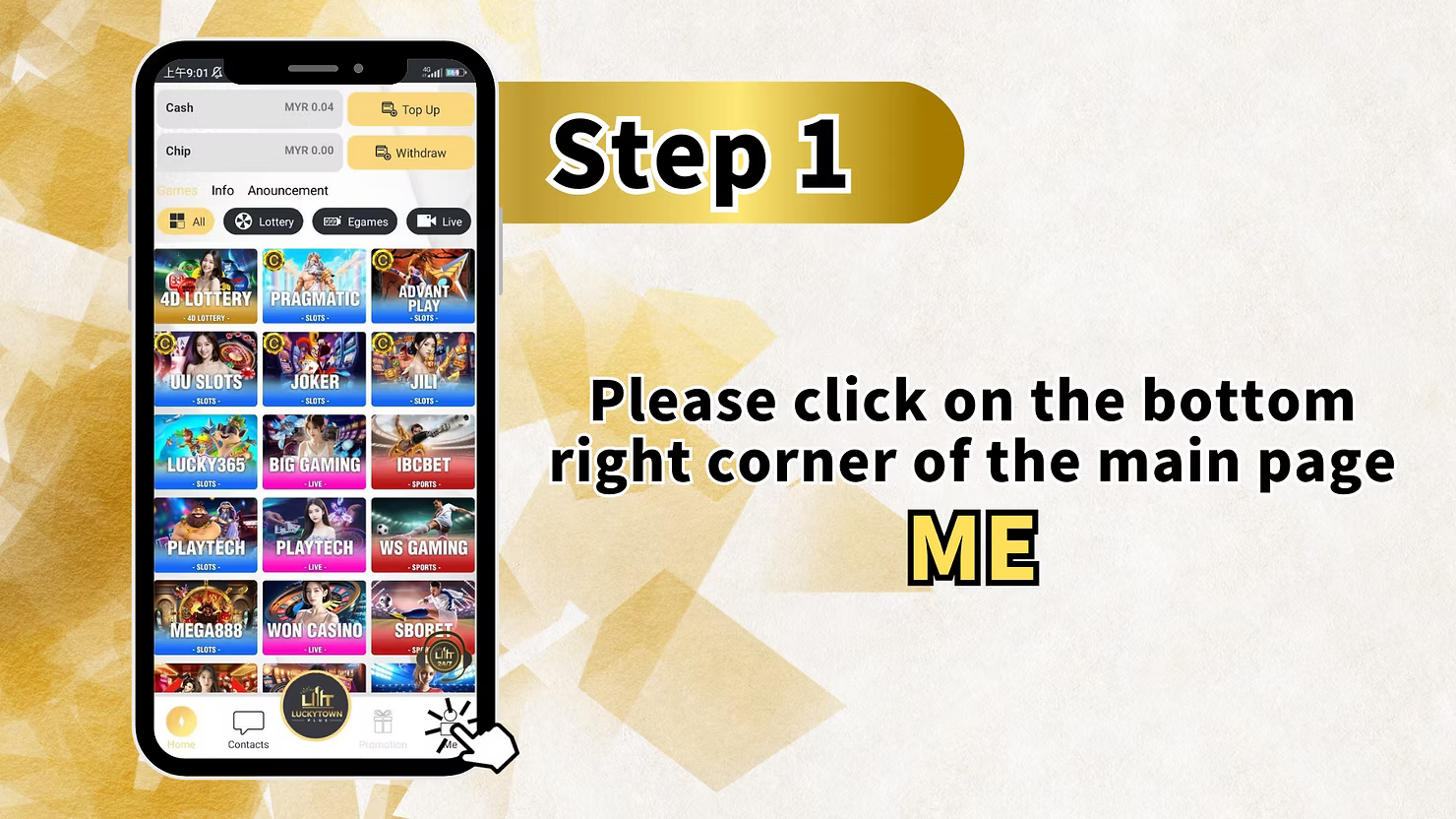
Step 1: Access the "UPE" Section
Log in to your LUCKY TOWN PLUS account. On the main page, locate and click the "UPE" button in the bottom right corner. This opens the UPAY payment interface.
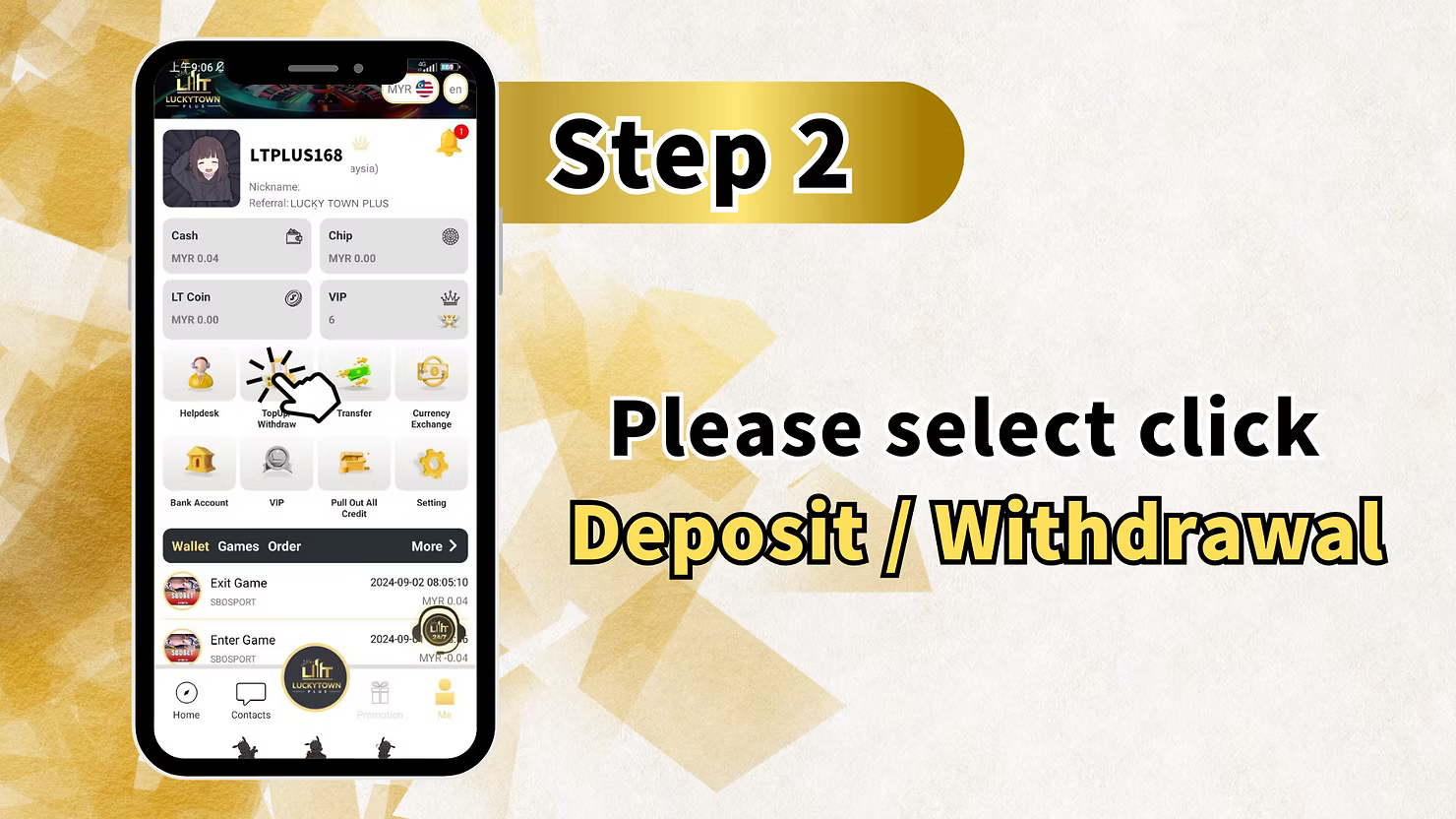
Step 2: Select "Recharge / Withdrawal"
From the UPAY menu, select "Recharge / Withdrawal" to access the payment options.
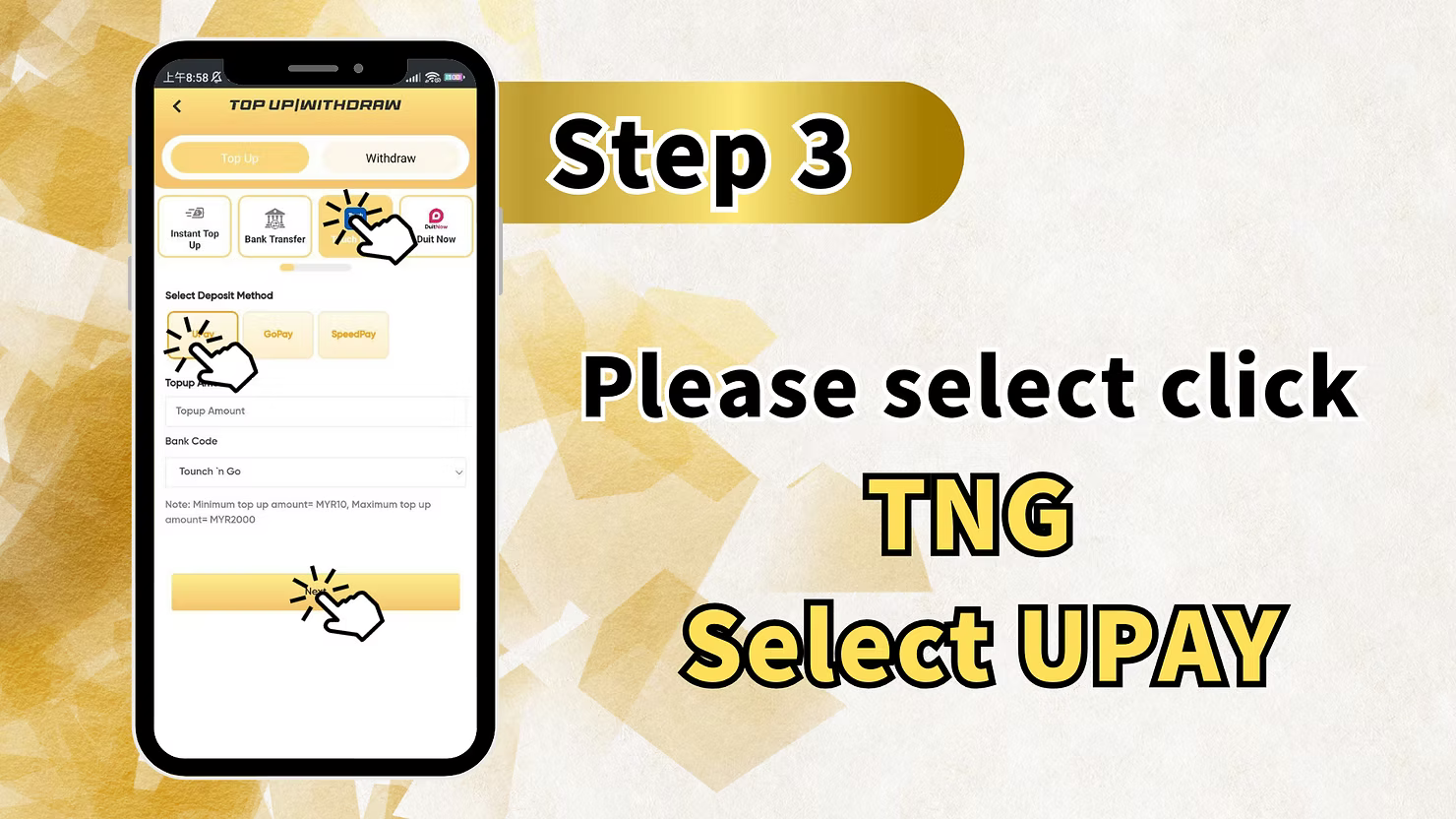
Step 3: Select "TNG Select UPAY"
On the recharge page, click the option for "TNG Select UPAY". This selects Touch N Go as your payment method through the UPAY system.
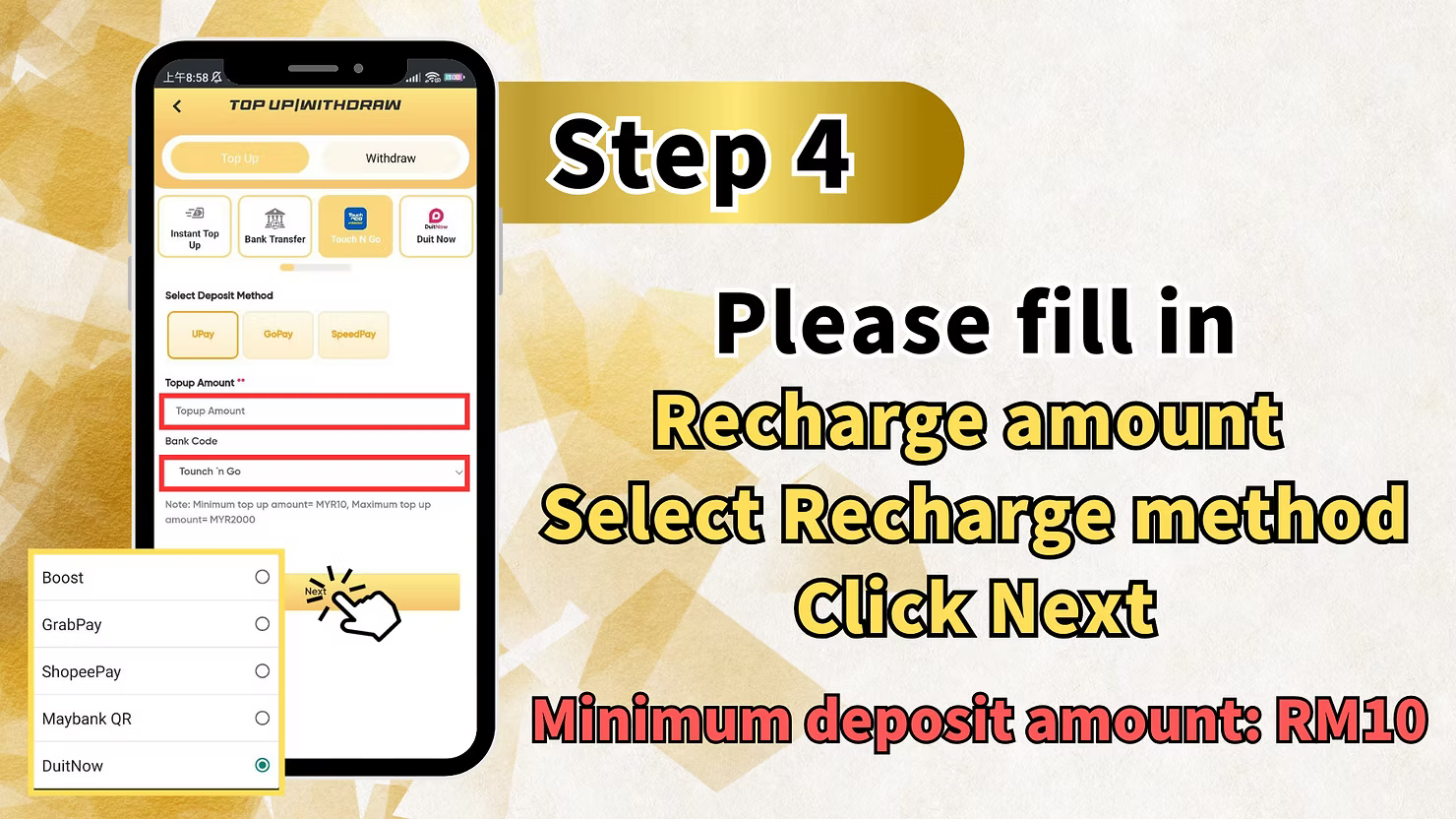
Step 4: Enter Recharge Amount and Select Method
Fill in the recharge amount you wish to deposit. Then select your preferred recharge method and click "Next" to proceed.
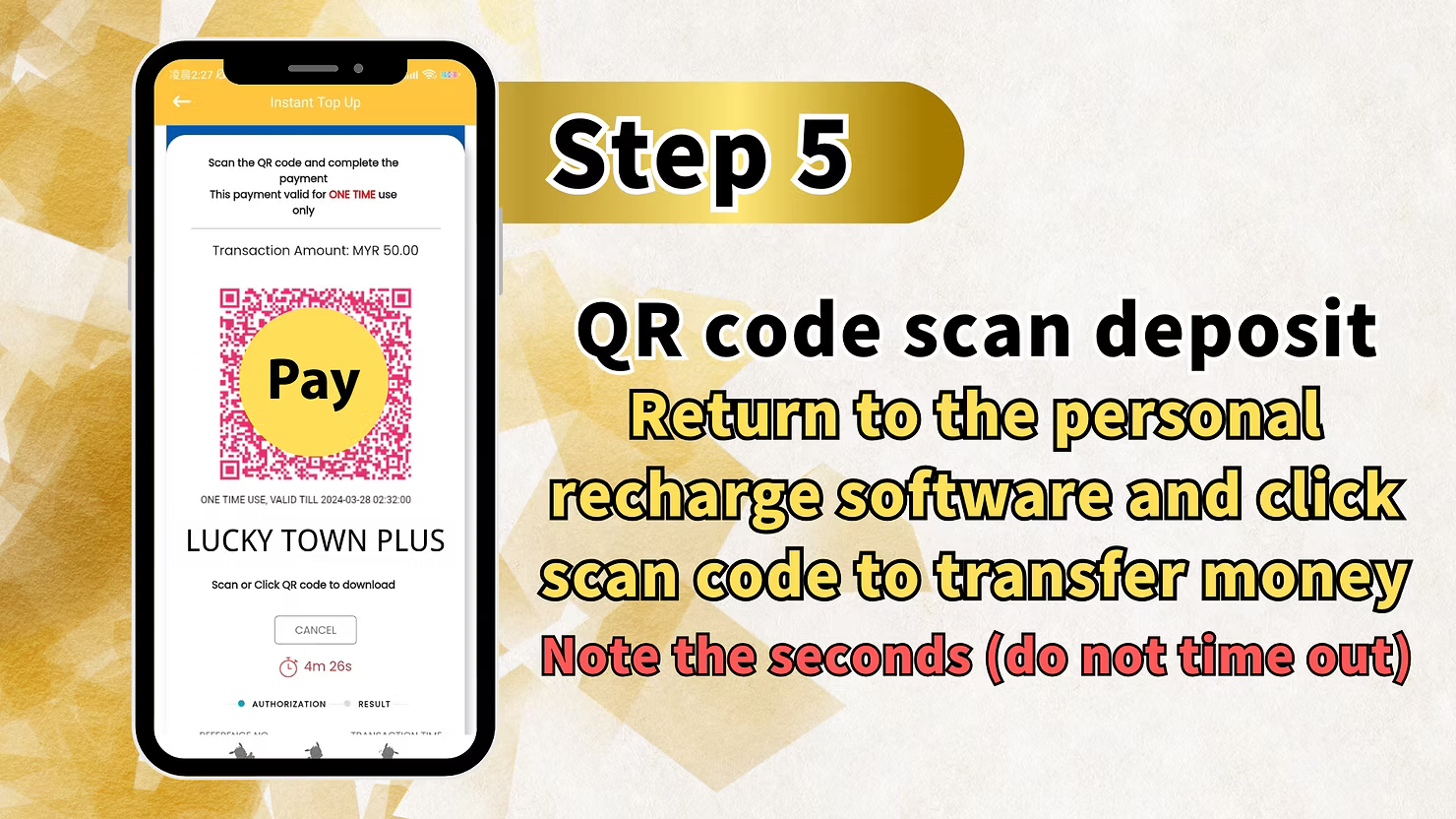
Step 5: QR Code Scan Deposit
The system will display a QR code for you to scan using your Touch N Go app.
How to Complete QR Scan
Open your Touch N Go e-wallet app, select the scan function, and scan the QR code displayed on your screen. Complete the payment in the TNG app.
Return to Personal Recharge Software
"Return to the personal recharge software and click next. Once the account is ready, click the second (do not time out)." After completing the payment in TNG, return to the LUCKY TOWN PLUS interface and click next. Ensure you complete this step promptly to avoid timeout issues.
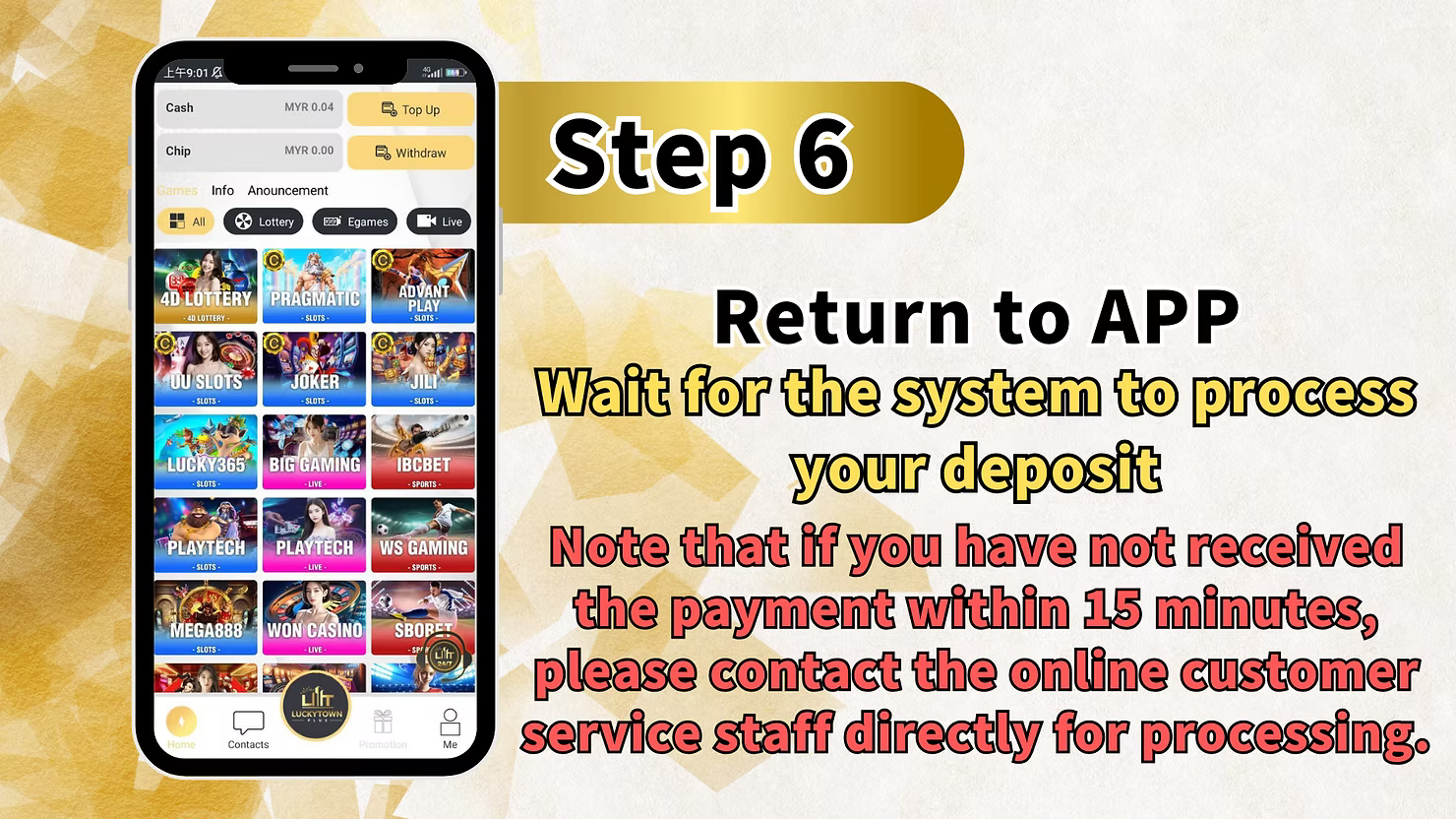
Step 6: Wait for Processing
After completing your payment and confirming in the app, return to the LUCKY TOWN PLUS main interface and wait for the system to process your deposit.
Processing Time and Support
"Note that if you have not received the payment within 15 minutes, please contact the online customer service staff directly for processing." If your deposit isn't credited within 15 minutes, contact customer support immediately with your transaction details.
Method 2: GO PAY TNG – Complete Step-by-Step Guide

Step 1: Access the Main Page Bottom Right Corner
Log in to your LUCKY TOWN PLUS account. On the main page, locate and click the appropriate button in the bottom right corner (likely "Me" or similar) to access your dashboard.
Step 2: Select "Deposit / Withdrawal"
From your dashboard, click on "Deposit / Withdrawal" to access the financial transaction page.
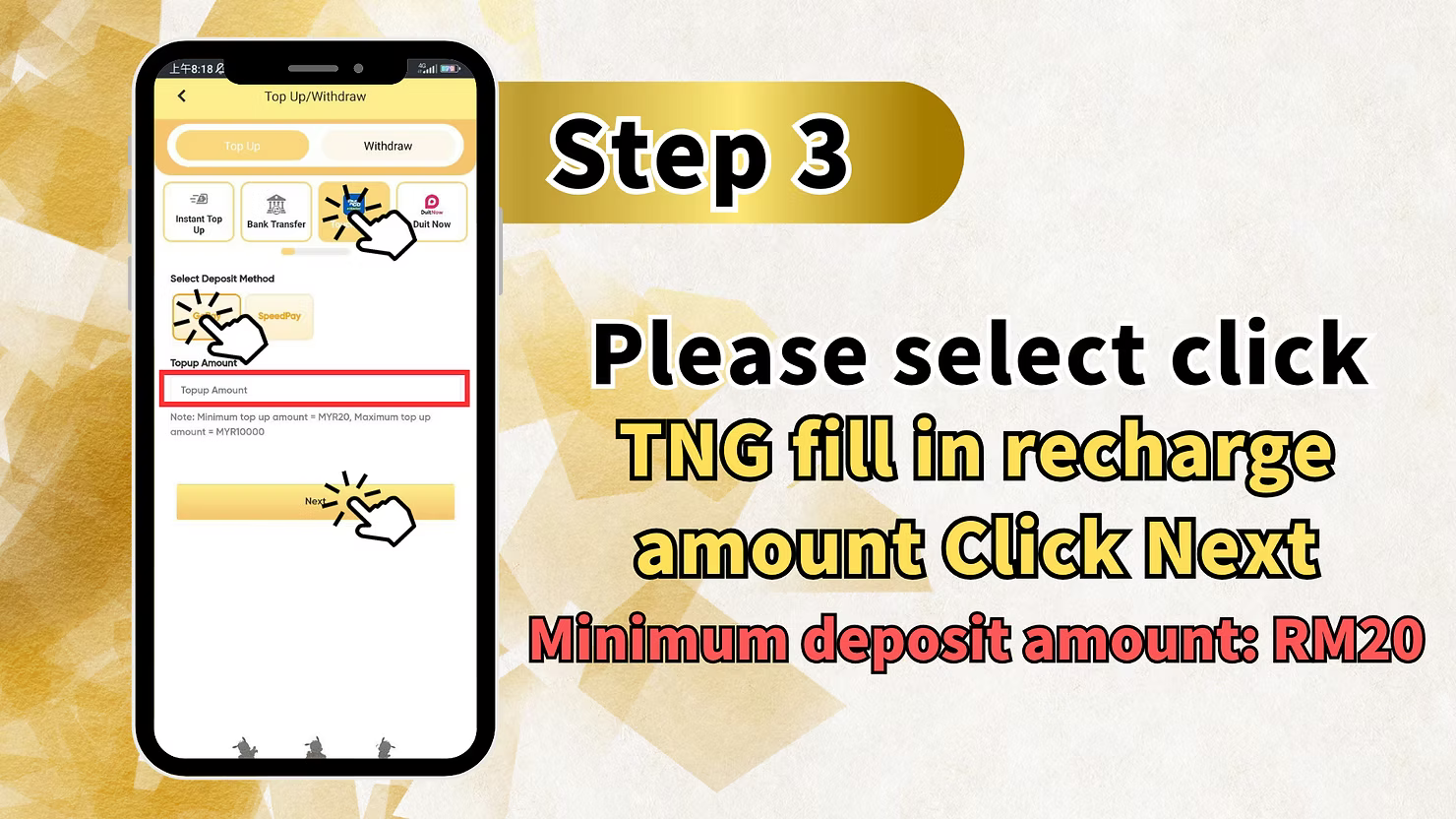
Step 3: Select "VISA" in Navigation Menu and Click Submit
In the navigation menu, select "VISA" as your payment option. This may be the designated option for GO PAY TNG deposits. After selecting, click "Submit" to proceed.
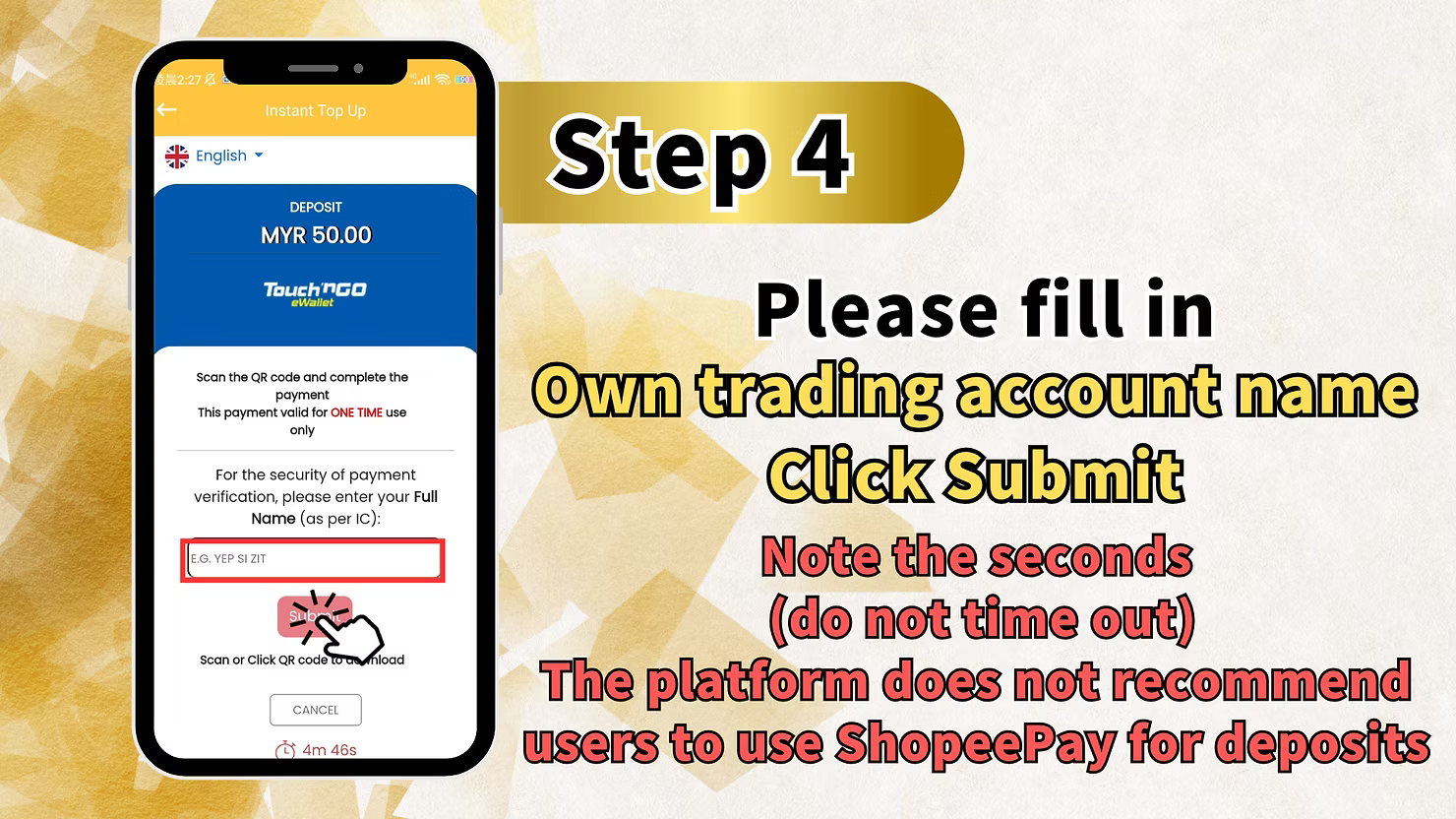
Step 4: Fill in Trading Account Name and Submit
Enter your trading account name exactly as registered with LUCKY TOWN PLUS. Click "Submit" to continue.
Important Timeout Notice
"(do not time out)" – Complete this step promptly to avoid session timeout. If you take too long, you may need to restart the process.
Support Contact
"If you have not received amount please contact the online customer service staff directly for processing." If issues arise at this stage, contact customer support.
Step 5: QR Code Scan Deposit
The system will display a QR code for you to scan using your Touch N Go app.
How to Complete QR Scan
"Scan the QR code to complete the payment process." Open your Touch N Go e-wallet, scan the QR code, and complete the payment.
Important Notice About Processing Time
"Please note that if you have not received the amount within 15 minutes, minimum deposits will be charged." This indicates that if your deposit isn't processed within 15 minutes, you may still be charged for the minimum deposit amount. Contact customer service immediately if you encounter delays.
Important Notes for TNG Scan QR Top Up
Processing Time
Both UPAY TNG and GO PAY TNG deposits should be processed within 15 minutes. If your funds are not credited within this timeframe, contact LUCKY TOWN PLUS customer service immediately.
Timeout Prevention
Both methods include warnings about timeout. Complete each step promptly and do not leave the deposit process idle for extended periods.
Name Matching Requirement
For GO PAY TNG, you must enter your trading account name exactly as registered. Ensure this matches your LUCKY TOWN PLUS account information.
QR Code Scanning
Both methods use QR code scanning through the Touch N Go app. Ensure your TNG app is updated and you have sufficient balance before starting.
Frequently Asked Questions About TNG Scan QR Top Up
What Is TNG Scan QR Top Up?
TNG Scan QR Top Up allows you to deposit funds into your LUCKY TOWN PLUS account by scanning a QR code with your Touch N Go e-wallet app. It's fast, secure, and convenient.
Which TNG Method Should I Choose?
LUCKY TOWN PLUS offers two TNG QR options:
- UPAY TNG – Accessed through the UPE button, with clear step-by-step instructions
- GO PAY TNG – Accessed through VISA option, with additional name verification
What Is the Minimum Deposit Amount?
While not explicitly stated in all steps, the GO PAY TNG method mentions that if processing fails within 15 minutes, "minimum deposits will be charged." This suggests there is a minimum deposit amount – typically RM10 as seen in other LUCKY TOWN PLUS payment methods.
How Long Does a TNG QR Deposit Take?
Most TNG QR deposits are processed within minutes. If your deposit is not credited within 15 minutes, contact customer service immediately.
What If My Deposit Doesn't Arrive After 15 Minutes?
If you have not received your deposit confirmation within 15 minutes, contact LUCKY TOWN PLUS online customer service directly. Have your transaction details and QR code receipt ready for faster assistance.
What Does "Do Not Time Out" Mean?
This warning means you should complete each step promptly. If you take too long between steps, your session may expire and you'll need to restart the deposit process.
Do I Need to Verify My Account Before Depositing?
You can deposit without completing Real Name Verification, but verified accounts have higher limits and smoother withdrawal processes. It's recommended to complete verification early.
Why Choose TNG Scan QR Top Up on LUCKY TOWN PLUS?
Touch N Go is Malaysia's most popular e-wallet, used by millions for daily transactions. LUCKY TOWN PLUS offers two convenient TNG QR deposit methods, giving you flexibility in how you fund your account. With fast processing (within 15 minutes), clear step-by-step instructions, and dedicated customer support if issues arise, TNG Scan QR Top Up is an excellent choice for players who prefer e-wallet convenience. LUCKY TOWN PLUS is committed to providing secure, efficient payment options for all members.
Top Up Now with TNG Scan QR on LUCKY TOWN PLUS
Ready to add funds using Touch N Go? Choose between UPAY TNG or GO PAY TNG and follow our step-by-step guides. Scan the QR code, complete payment in the TNG app, and get credited within 15 minutes. Log in now to start your top up – or sign up in minutes using your Malaysia phone number.
Start TNG Scan QR Top Up