

LUCKY TOWN PLUS makes it easy to recommend friends and share the excitement with your network. Whether you want to invite friends to join, share promotions, or even transfer funds, our recommendation tools give you multiple options. LUCKY TOWN PLUS values community, and sharing with friends is the best way to grow together.
Step-by-Step Guide to Recommend Friends

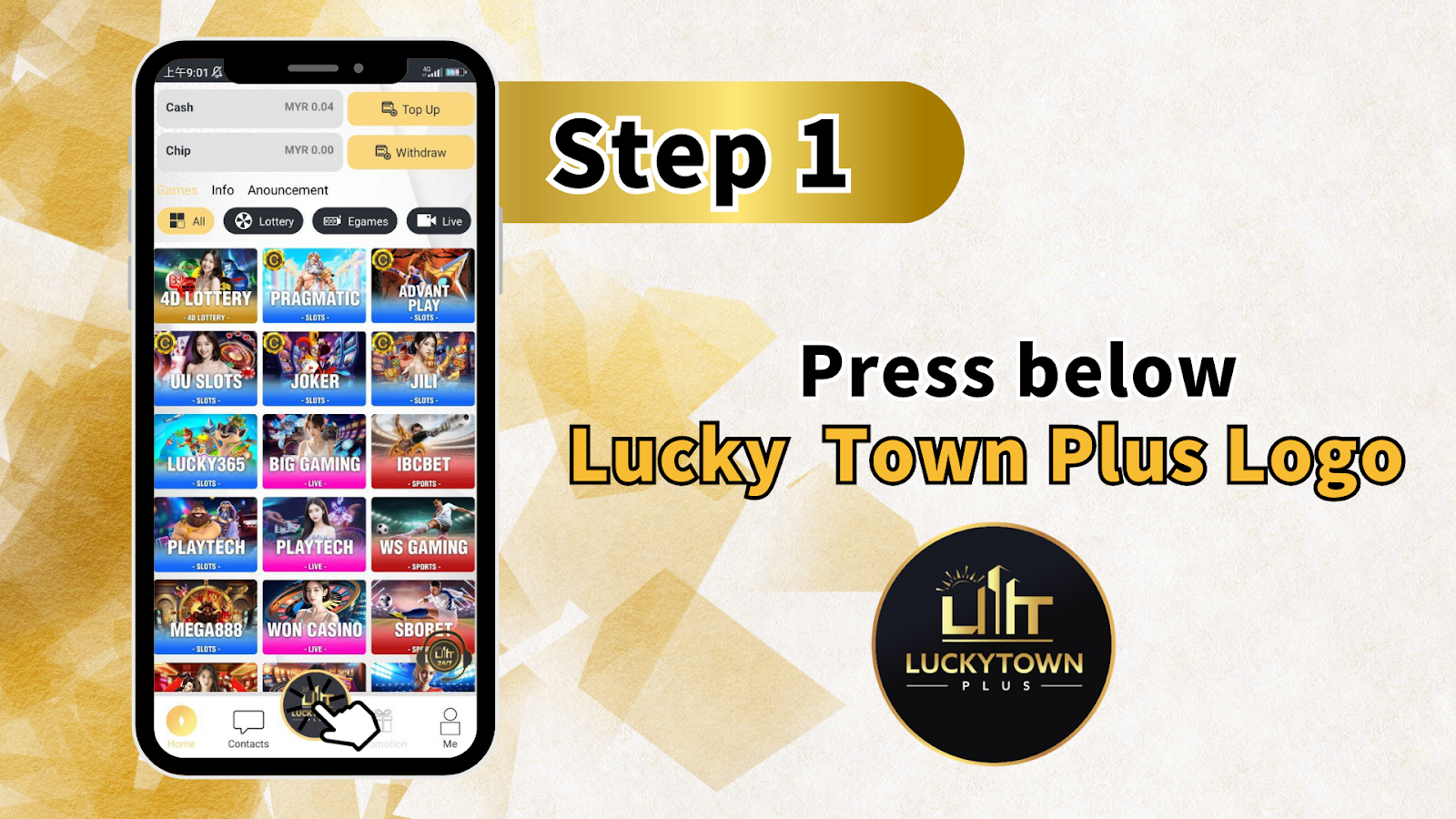
Step 1: Press the LUCKY TOWN PLUS Logo
To begin the recommendation process, simply press the LUCKY TOWN PLUS logolocated at the bottom of the app or website interface. This will open the recommendation menu where all sharing options are available.
Visual Reference
Look for the LUCKY TOWN PLUS logo with the "Lift" or "LILIT" branding. Tapping this icon is the first step to accessing your unique referral tools.
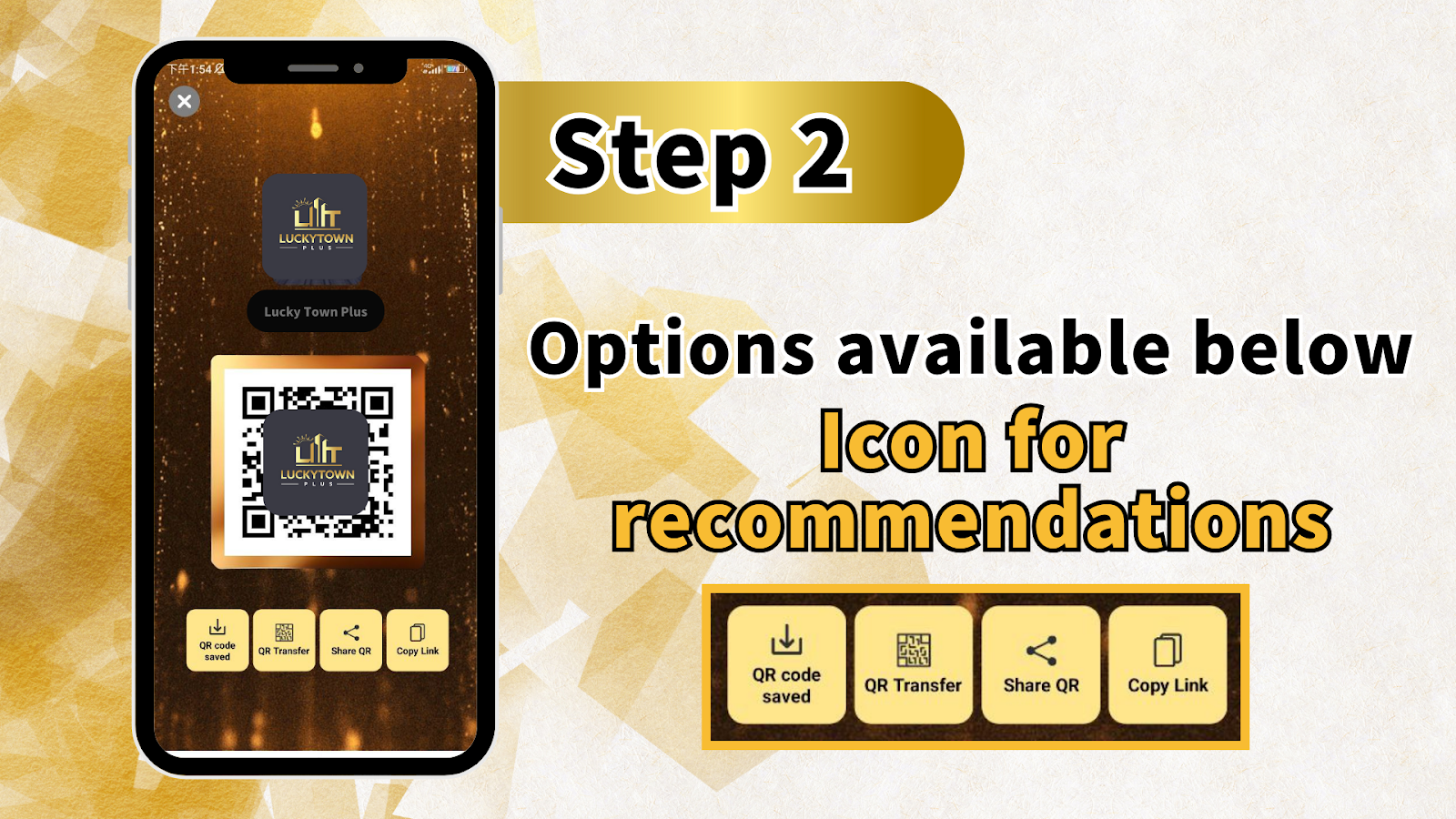
Step 2: Access Your Recommendation Options
After pressing the logo, you will see your personalized Lucky Town Plus or LUCKYTOWNPlus dashboard. From here, you have four main options to recommend friends:
Option 1: QR Code Saved
Your unique QR code will be displayed and automatically saved or made available for saving. You can save this QR code to your device's photo gallery for later use or direct sharing.
Option 2: QR Transfer
Select "QR Transfer" to scan another player's QR code and transfer money directly to their account. This is useful for sending funds to friends or family who are already LUCKY TOWN PLUS members.
Option 3: Share QR Code
Choose "Share QR Code" to instantly share your referral QR code through other apps on your device, such as WhatsApp, Telegram, Facebook, Messenger, or email. This makes it easy to invite friends who aren't yet on LUCKY TOWN PLUS.
Option 4: Copy Link
Select "Copy Link" to copy your unique referral link to your clipboard. You can then paste this link anywhere – in messages, social media posts, or websites – to allow friends to click and register directly.
Detailed Explanation of Promotion Options
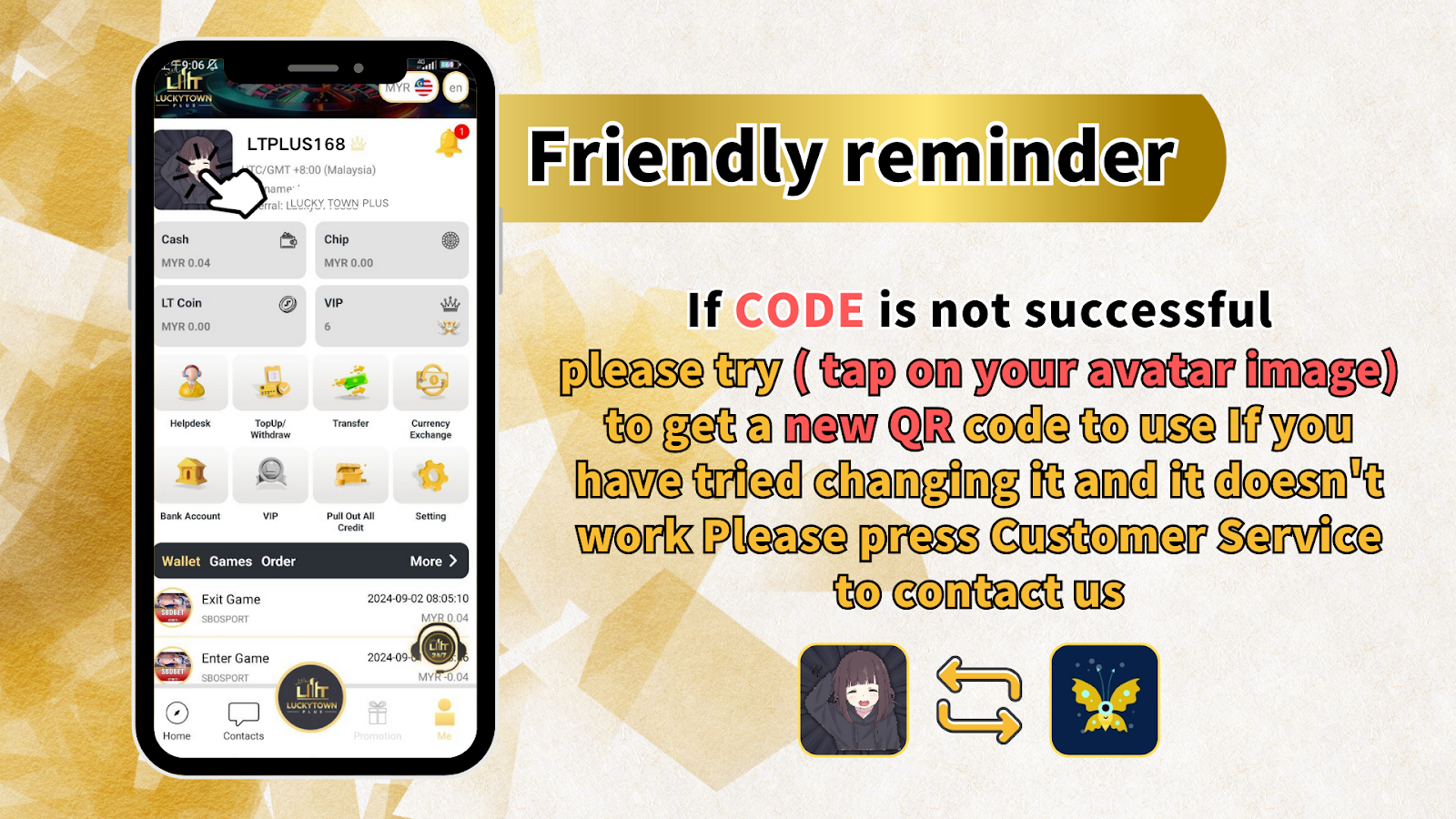
Four Ways to Promote and Recommend
Below is a detailed explanation of each promotion option available when you recommend friends on LUCKY TOWN PLUS:
1. QR Can Be Saved for Promotion
Your personal QR code is a quick and easy way for friends to access LUCKY TOWN PLUS. When saved to your device, you can print it, display it, or share it in any medium. Friends simply scan the code with their smartphone camera to be directed to the appropriate page.
2. Transfer (Scan Code to Transfer Money)
The "Transfer" feature allows you to scan another player's QR code to transfer money directly to their LUCKY TOWN PLUS account. This is perfect for sending funds to friends, settling bets, or helping new members get started. Transfers are processed securely and instantly.
3. Share QR Code (Share to Other Apps)
"Share QR Code" integrates with your device's sharing features, allowing you to send your referral QR code through any installed app. Whether it's WhatsApp, Telegram, LINE, or social media, your friends will receive the QR code image and can scan it to join LUCKY TOWN PLUS.
4. Copy Link (Click the Link to Register)
The "Copy Link" option gives you a text-based referral link. When friends click this link, they'll be taken directly to the LUCKY TOWN PLUS registration page. This is ideal for sharing in group chats, forums, or anywhere text is preferred over images.
Troubleshooting: If QR Code Is Not Successful
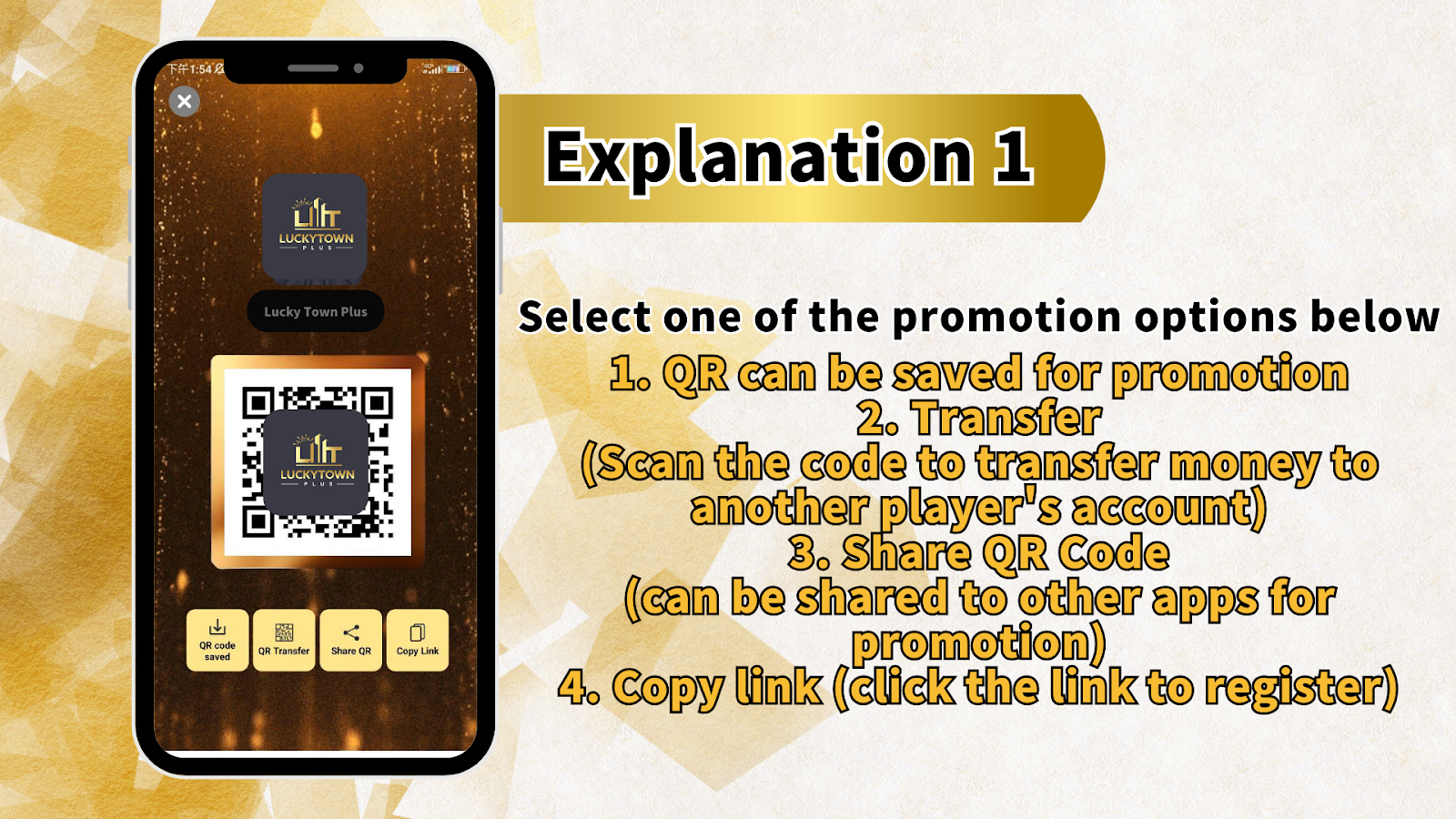
Friendly Reminder for Code Issues
If you experience issues with your referral code or QR code not working properly, follow these troubleshooting steps:
Step 1: Tap on Your Avatar Image
Navigate to your profile by tapping on your avatar image. This is typically located in the top corner of the app or website.
Step 2: Generate a New QR Code
From your profile, you can generate a new QR code to use. Sometimes codes expire or encounter technical issues – refreshing your QR code often resolves the problem.
Step 3: Try Changing It
If the first new code doesn't work, you can generate another one. The system allows you to refresh your QR code as needed.
Step 4: Contact Customer Service
If you have tried changing your QR code multiple times and it still doesn't work, please press Customer Service to contact the LUCKY TOWN PLUS support team. They will assist you in resolving any technical issues with your referral tools.
Complete Number Reference for LUCKY TOWN PLUS
Understanding the Number Sequence
The LUCKY TOWN PLUS platform uses a comprehensive numbering system for various features and promotions. While this page focuses on recommending friends, the numbers 1 through 1388 (and beyond) represent the extensive range of options, games, and features available across the platform.
Frequently Asked Questions About Recommending Friends
Do I Need to Be a Member to Recommend Friends?
Yes, you must have an active LUCKY TOWN PLUS account to access the recommendation features. If you're not yet a member, sign up first using your Malaysia phone number.
Is There a Limit to How Many Friends I Can Recommend?
There is no stated limit to the number of friends you can recommend. You can share your QR code and referral link as often as you like.
Can I Transfer Money to Any LUCKY TOWN PLUS Member?
Yes, you can transfer funds to any member by scanning their QR code through the "QR Transfer" feature. Both parties must have active accounts.
What If My Friend Can't Scan the QR Code?
If scanning isn't possible, use the "Copy Link" option to share a text-based registration link. This works on any device with internet access.
How Do I Know If My Referral Was Successful?
When a friend registers using your link or QR code, the system typically tracks referrals. Check your account or contact customer service for confirmation.
Is Sharing QR Codes Safe?
Yes, sharing your referral QR code is safe. It only contains information needed to direct new users to registration or to identify you for transfers. Your personal and financial information remains secure.
Why Recommend Friends on LUCKY TOWN PLUS?
Recommending friends to LUCKY TOWN PLUS is more than just sharing a platform – it's about building a community. With easy-to-use tools like QR codes, transfer options, and shareable links, inviting others is simple and convenient. LUCKY TOWN PLUS values every member and makes it easy to bring your network along for the experience.
Start Recommending Friends on LUCKY TOWN PLUS Today
Ready to share LUCKY TOWN PLUS with your friends? Follow our step-by-step guide to access your QR code, copy your referral link, and start inviting. Log in now to access your recommendation tools – or sign up in minutes using your Malaysia phone number.
Recommend Friends on LUCKY TOWN PLUS