
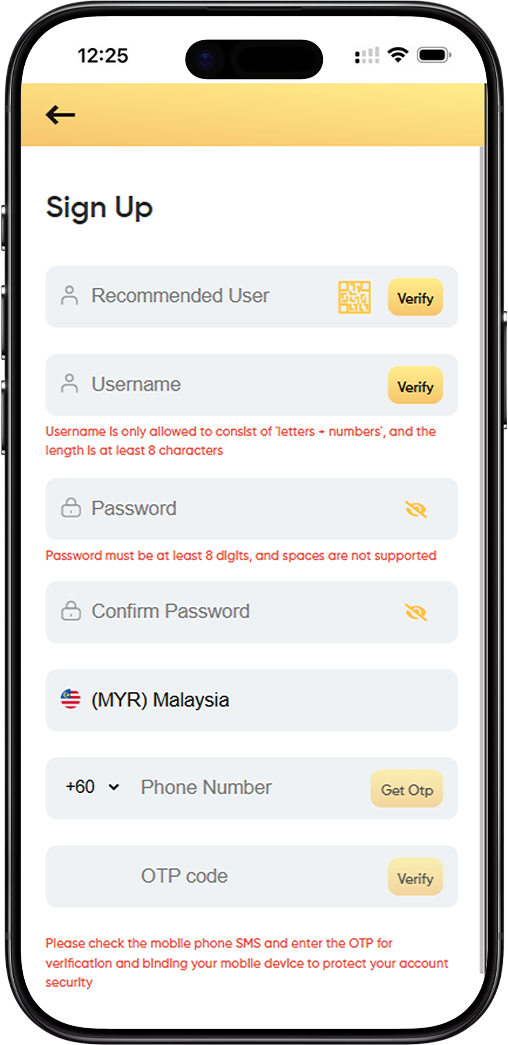
Registering for LUCKY TOWN PLUS is designed to be straightforward while maintaining high security standards. Whether you're new to the platform or transitioning from the original LUCKY TOWN PLUS experience, this guide will walk you through every field and requirement. Our people-first approach ensures you understand not just what to do, but why each step matters for your account security.
Complete Walkthrough of Each Registration Field
The LUCKYTOWNPLUSO Field – What Is It For?
You may notice a field labeled "LUCKYTOWNPLUSO" at the top of the registration form. This is an optional identifier that may be used for promotional codes or special access invitations. If you don't have a code, you can typically leave this blank. The LUCKY TOWN PLUS support team occasionally distributes these codes during community events.
Username Creation – Rules and Verification Process
Your username is your identity within the LUCKY TOWN PLUS ecosystem. The platform enforces specific rules to maintain a clean and organised community. Usernames may only consist of letters (a-z, A-Z) and numbers (0-9). Special characters and symbols are not permitted. Additionally, usernames must be at least 8 characters long to ensure uniqueness and security.
How Username Verification Works
After entering your desired username, you must click the "Verify" button. This checks our database to confirm that your chosen name hasn't already been taken by another LUCKY TOWN PLUS member. The verification process takes only seconds and provides immediate feedback. If your username is unavailable, the system will suggest similar alternatives that follow the same letter+number format.
Password Requirements – Building Strong Security
Password security is fundamental to protecting your LUCKY TOWN PLUS account. Your password must meet two primary requirements: it must be at least 8 characters long, and it cannot contain spaces. While these are the minimum requirements, we recommend creating a stronger password by combining uppercase letters, lowercase letters, numbers, and special characters where possible.
Why Password Confirmation Matters
The registration form includes both "Password" and "Confirm Password" fields. This dual-entry system helps prevent typos that could otherwise lock you out of your account. The system compares both entries in real-time and will alert you if they don't match before you proceed.
Malaysia Phone Number Verification with OTP
LUCKY TOWN PLUS requires phone verification for all Malaysia-based accounts. Select "(MYR) Malaysia" from the country code dropdown, then enter your full mobile number starting with the +60 prefix. This step links your account to a physical mobile device, adding an essential layer of security.
The OTP Process Explained
After entering your number, click the "Get OTP" button. The system will immediately send a one-time passcode via SMS to the number you provided. This code typically arrives within 30-60 seconds. Enter the OTP code in the designated field and click "Verify" to complete the binding process. This verification confirms that you have access to the mobile device and protects your account from unauthorised access attempts.
Step-by-Step Guide to Completing Your Registration
Step 1: Prepare Your Information
Before starting the LUCKY TOWN PLUS registration, gather the following: your preferred username (letters and numbers only, minimum 8 characters), a strong password you haven't used elsewhere, and your active Malaysia mobile phone number. Having these ready streamlines the process.
Step 2: Complete the Username Section
Enter your chosen username in the designated field. Double-check that it contains only letters and numbers and meets the 8-character minimum. Click "Verify" and wait for confirmation that your username is available.
What to Do If Username Is Taken
If verification fails, try adding numbers or adjusting your chosen name while keeping it memorable. The system may offer suggestions, but ultimately you'll need to find a unique combination that follows the letter+number rule.
Step 3: Create and Confirm Your Password
Enter your password in the first field, then type it again exactly in the "Confirm Password" field. Take a moment to ensure both entries match. Remember that spaces are not supported, so avoid using the space bar. The system will indicate when your passwords match and meet the length requirement.
Step 4: Complete Phone Verification
Select "(MYR) Malaysia" from the country dropdown and enter your full +60 mobile number. Click "Get OTP" and wait for the SMS message to arrive on your phone. Enter the code exactly as received in the OTP field and click "Verify".
Troubleshooting OTP Delivery
If you don't receive the code within 60 seconds, check that your number was entered correctly and that your phone has signal reception. You can request a new code after 60 seconds. The system allows up to three attempts for security reasons.
Step 5: Final Submission
Once all fields are completed and verified, review your information one last time. Click the "Submit" button to create your LUCKY TOWN PLUS account. You'll be redirected to a welcome page or dashboard confirming your successful registration.
Frequently Asked Questions About LUCKY TOWN PLUS Registration
Can I Change My Username After Registration?
Usernames on LUCKY TOWN PLUS are permanent identifiers linked to your account. Choose carefully during registration. If you have a compelling reason to change your username after creating your account, you'll need to contact LUCKY TOWN PLUS customer support, though such changes are not guaranteed.
Is My Personal Information Secure During Registration?
LUCKY TOWN PLUS employs industry-standard encryption for all registration data. Your password is hashed and never stored in plain text. Phone numbers are used only for account security and essential communications, never shared with third parties without your explicit consent.
LUCKY TOWN PLUS Privacy Commitment
The LUCKY TOWN PLUS privacy policy provides complete details on data handling. We believe in transparency and giving you control over your information. Your trust is the foundation of our community.
What Happens After I Click Submit?
After successful submission, your LUCKY TOWN PLUS account is created instantly. You'll receive a welcome email or SMS confirmation. You can then log in using your new username and password. We recommend completing your profile information and exploring the platform's features.
Why Phone Verification Matters for Your Security
Phone verification serves multiple security purposes for LUCKY TOWN PLUS. It confirms you're a real person, not an automated bot. It creates a recovery channel if you ever forget your password. And it enables two-factor authentication options that can be added later.
Building a Safer Community Together
The LUCKY TOWN PLUS commitment to security means every account is protected by this verified connection to your mobile device. This extra step helps keep bad actors out and ensures a safer experience for all members.
Tips for a Smooth Registration Experience
Before You Begin
To ensure your LUCKY TOWN PLUS registration goes smoothly, use a stable internet connection and have your phone nearby when requesting the OTP. Write down your username and password in a secure location. Consider using a password manager to store your credentials safely.
Common Pitfalls to Avoid
Remember that all fields must be completed in one session, as the system doesn't save partial registrations. Double-check that your username contains only letters and numbers, your password has no spaces, and your phone number includes the correct +60 prefix.
Getting Help When You Need It
If you encounter any issues during registration, the LUCKY TOWN PLUS support team is available to help. Common issues include mistyped phone numbers, usernames that don't meet requirements, or passwords that are too short. Check each field against the requirements shown on the form before contacting support.
Quick Access via QR Code
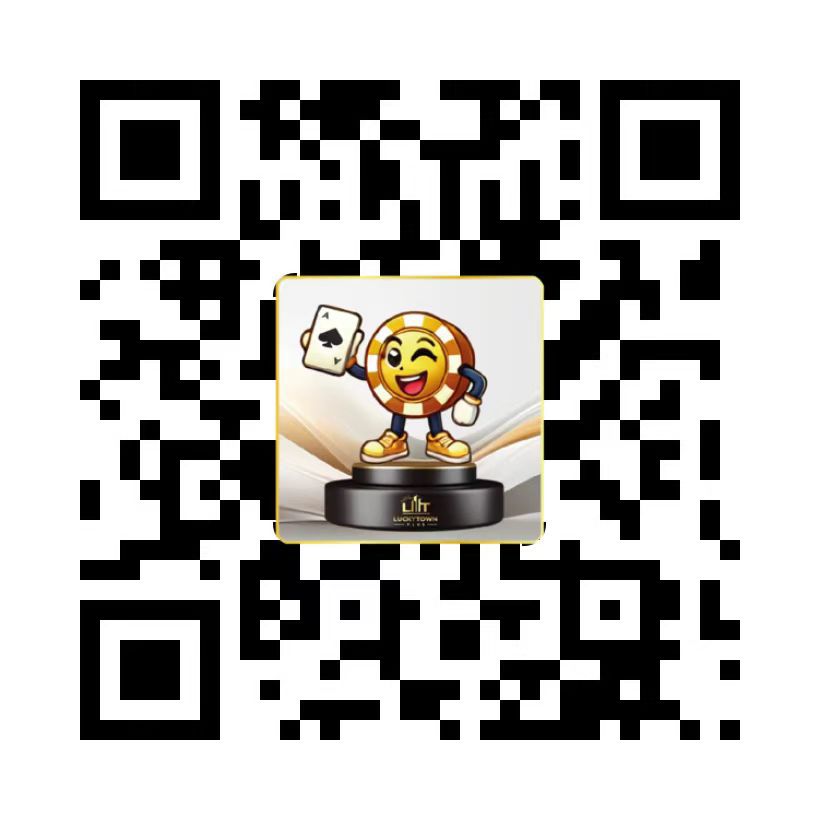
Scan to Register Instantly
For even faster access to the LUCKY TOWN PLUS registration page, simply scan the QR code below with your mobile device. This will take you directly to https://luckytownplus0.com/register without needing to type the URL manually.
QR Code Instructions
Open your smartphone's camera app or a QR code scanner. Point it at the code below. A notification will appear – tap it to open the LUCKY TOWN PLUS registration page in your mobile browser. From there, you can complete the sign-up process using your Malaysia phone number.
Why Use the QR Code?
Using the QR code ensures you're visiting the correct, secure LUCKY TOWN PLUS registration URL without any typing errors. It's the fastest way to get started, especially on mobile devices where typing long URLs can be cumbersome.
Start Your LUCKY TOWN PLUS Journey Today
Join thousands of satisfied users who trust LUCKY TOWN PLUS for their secure community experience. Registration takes just minutes, and you'll immediately access all the features LUCKY TOWN PLUS has to offer.
Create Your LUCKY TOWN PLUS Account Now