

MEGA888 is one of Malaysia's most popular mobile casino platforms, featuring hundreds of exciting slot games and casino experiences. LUCKY TOWN PLUS provides seamless access to MEGA888 with dedicated test accounts, easy download options, and clear login instructions. Whether you're a new player or an existing MEGA888 user, this guide will walk you through every step from accessing the game to playing your favorite slots.
Step-by-Step Guide to Access MEGA888 on LUCKY TOWN PLUS
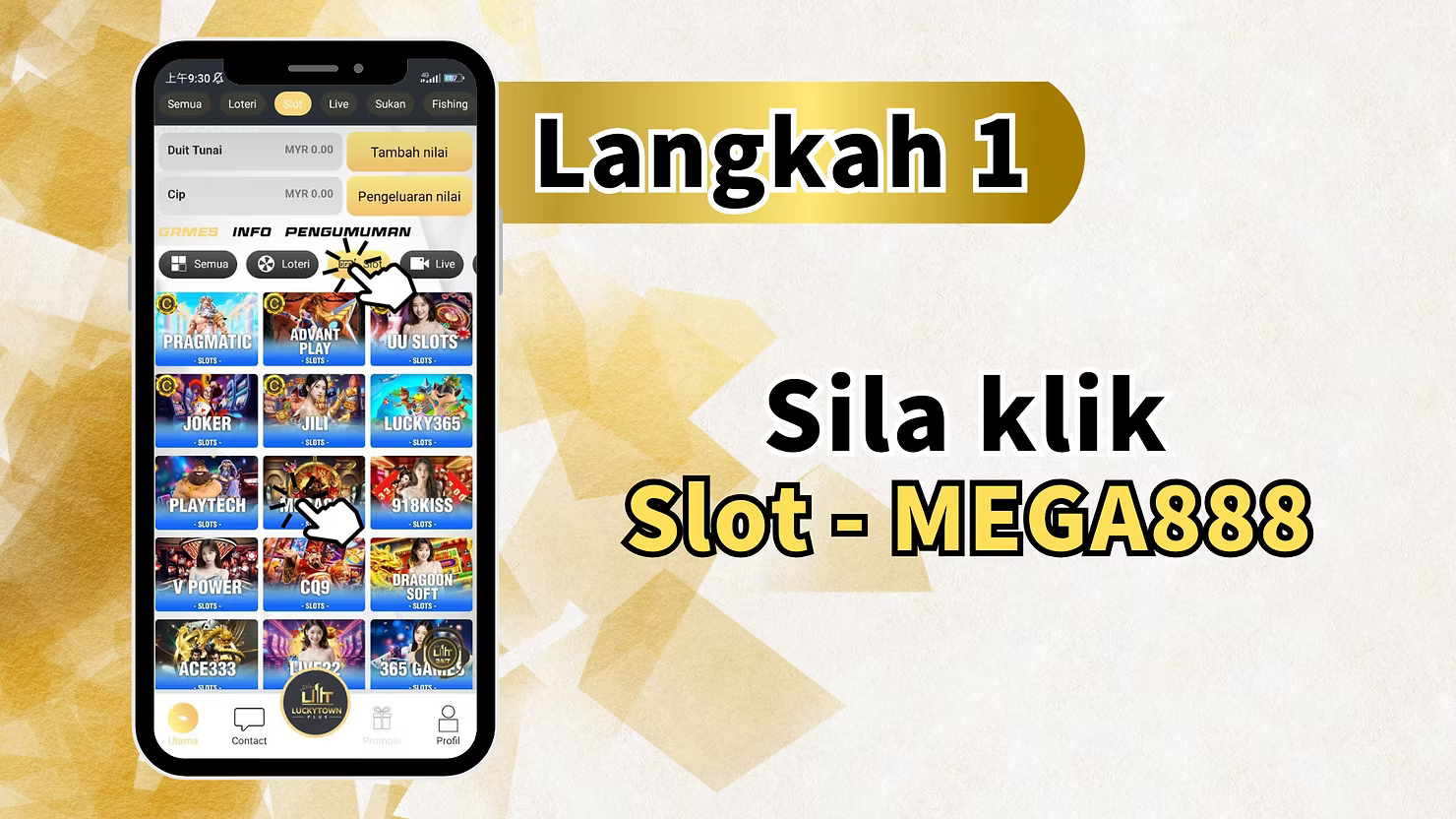
Step 1: Access Slots and Select MEGA888
Log in to your LUCKY TOWN PLUS account. From the main page, you will see several game categories displayed at the top: All (Semua) , Lottery (Loteri) , Live , Sport (Sukan) , Fishing. Click on "Slot" or navigate through these options to find the slot games section.
Main Page Overview
The main page also displays your current balances:
- Cash (Duit Tunai): MYR 0.00 – Your available cash balance
- Top Up (Tambah nilai) – Button to add funds
- Chip: MYR 0.00 – Your chip balance for games
- Withdraw (Pengeluaran nilai) – Button to withdraw funds
Game Providers Section
Below the balance section, you'll find various game providers listed including:
- Pharamatic (likely Pragmatic Play)
- SLOT 1
- JOKER
- PLAY TECH
- V POWER
- AC333 (Ace333)
- Contact – Customer support option
Locate and click on "MEGA888" from these options to access the MEGA888 game page.
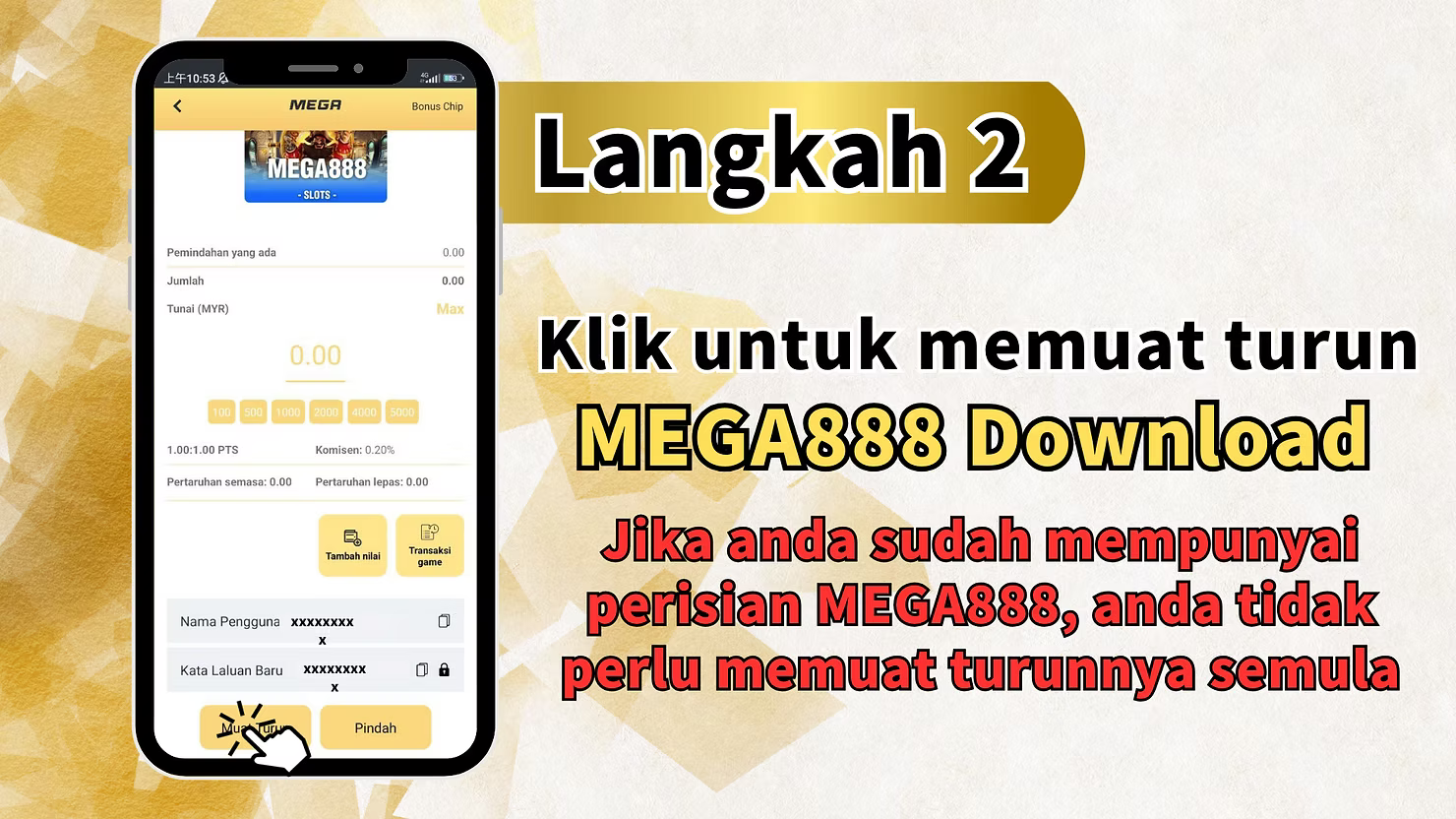
Step 2: Download MEGA888 Software
On the MEGA888 page, you will see a download prompt:
Download Button
"Click to download MEGA888 Download"– Click this button to begin downloading the MEGA888 software.
Important Note for Existing Users
"If you already have the MEGA888 software, you do not need to download it again." If you've previously installed MEGA888 on your device, you can skip the download steps and proceed directly to launching the game.
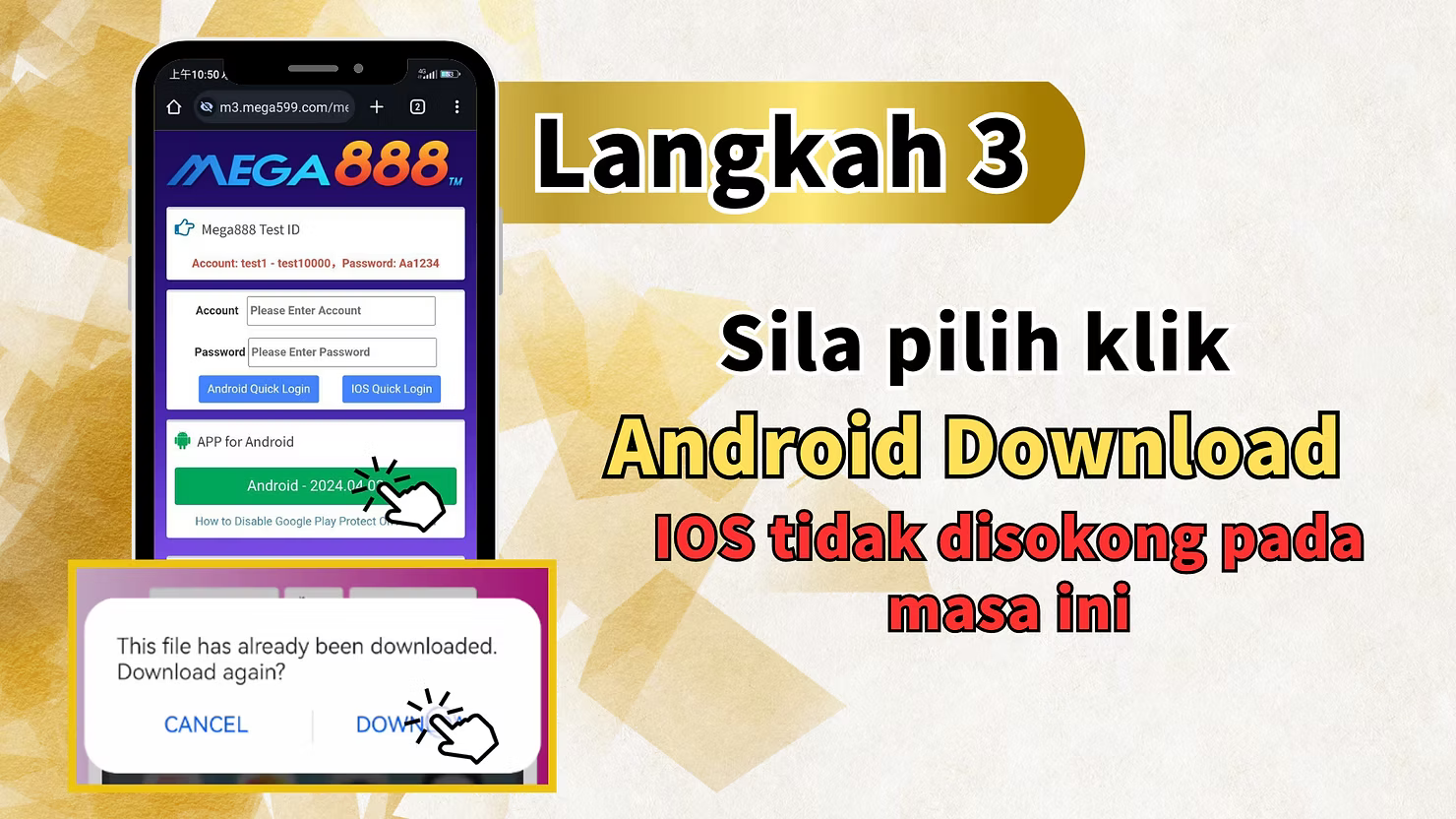
Step 3: Select Android Download and Review Test Accounts
After clicking download, you will be prompted to select your device platform:
Platform Availability
"Please select click Android Download" – The MEGA888 download is currently available for Android devices. The guide explicitly notes: "IOS is not currently supported" , meaning iPhone/iOS users cannot download the MEGA888 app through this method.
Test Account Information
The download page also provides test account credentials for users who want to try the game before depositing:
"Mega888 Test ID – Account: test1 - test10000, Password: Aa1234" – You can use these test accounts to explore MEGA888 games. The passwords are consistent across all test accounts.
Additional Resources
The page may also include:
- Android Quick Login – Fast login option for Android users
- iOS Quick Login – (Note: iOS not currently supported)
- APP for Android – Link to Android app
- Android - 2024.04.01 – Version date information
- How to Disable Google Play Protect – Important guidance for Android installation
Download Confirmation
You may see a message: "This file has already been downloaded. Download again?" – If you've previously downloaded the file, you can choose to download again or cancel and use the existing file.
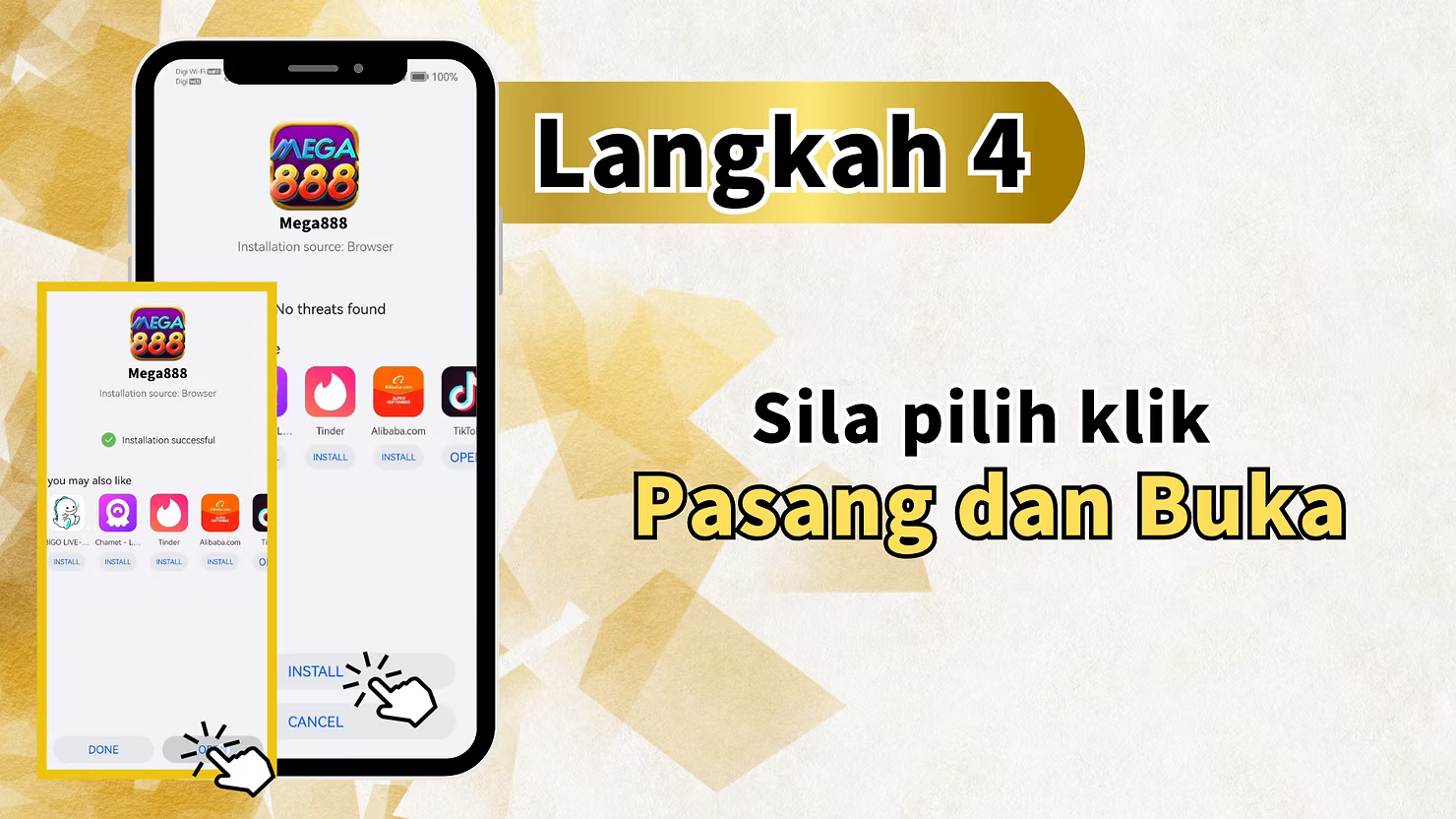
Step 4: Install and Open the App
Once the download is complete, you will be prompted to install the application:
Installation
"Please select click Install and Open" – Click to install the MEGA888 app on your Android device.
Important: Disable Google Play Protect
Android users may need to disable Google Play Protect temporarily to install the MEGA888 APK file. This is a standard step for installing apps outside the Google Play Store. Follow the guide's instructions or check your device settings.
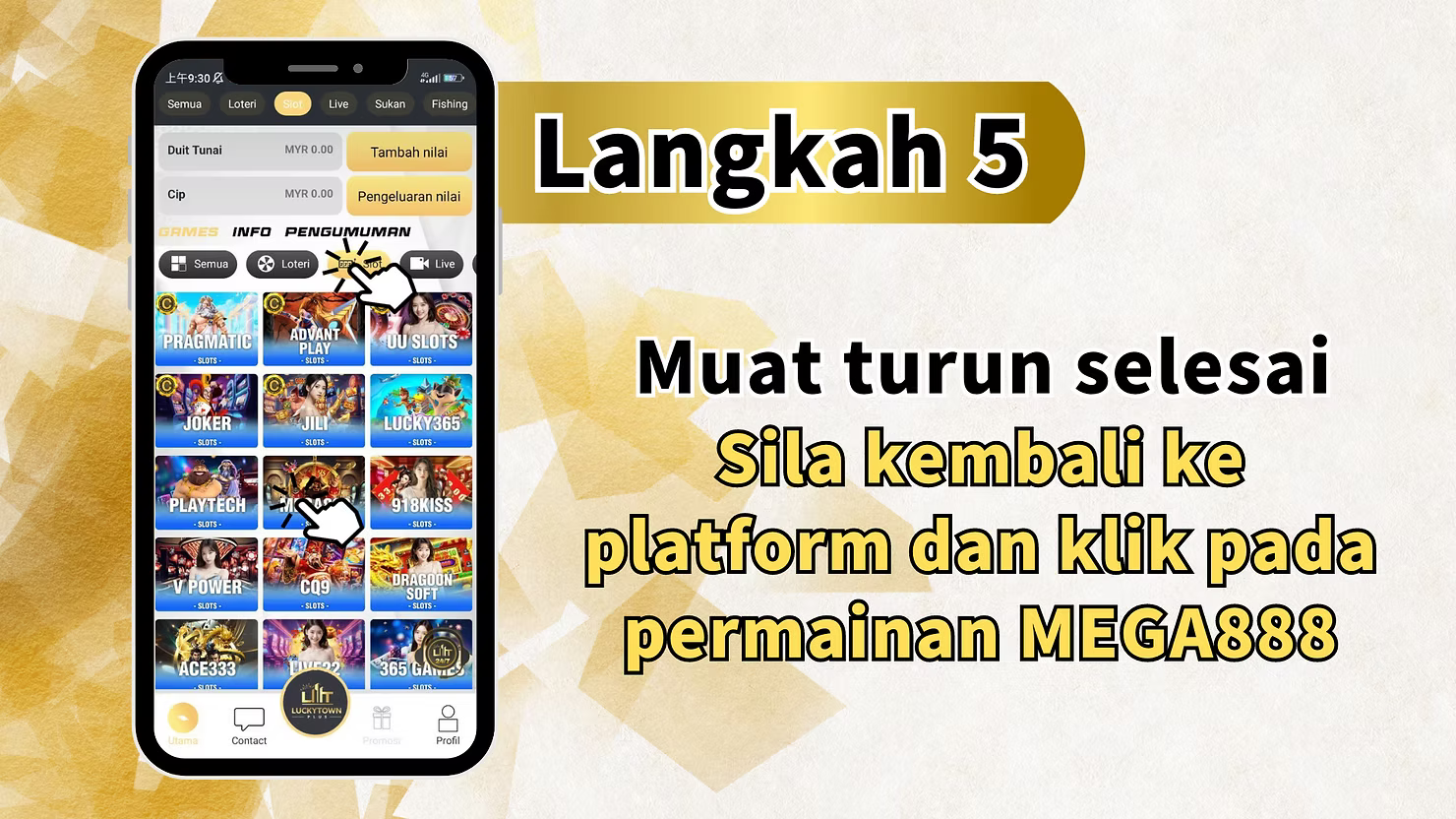
Step 5: Return to LUCKY TOWN PLUS Platform
After the download is complete and the app is installed, you need to return to the LUCKY TOWN PLUS platform:
Completion Message
"Download completed. Please return to the platform and click on the MEGA888 game." – Go back to the LUCKY TOWN PLUS website or app. Find the MEGA888 game icon again and click on it.
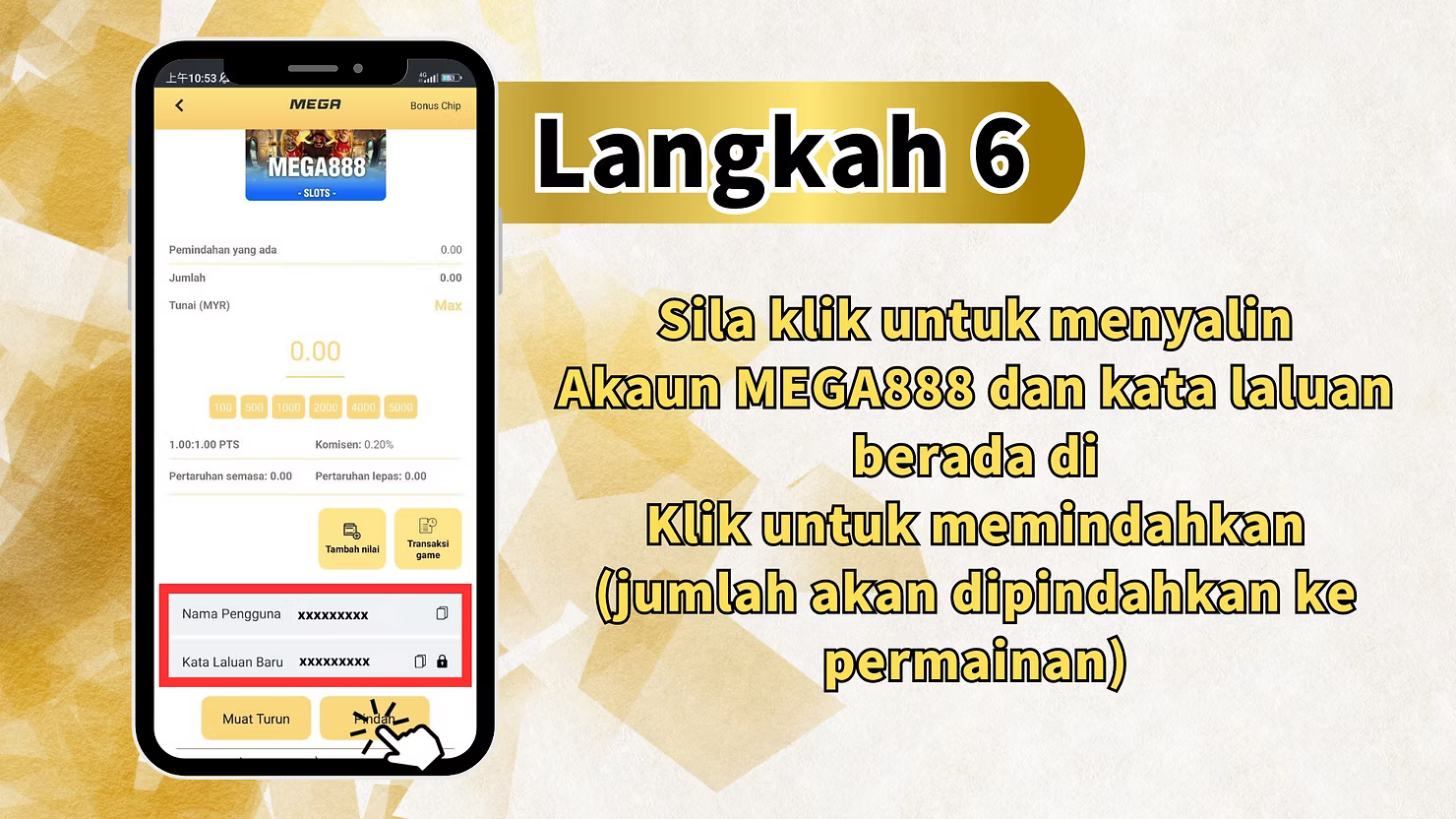
Step 6: Copy MEGA888 Account Credentials
When you click on MEGA888 from the LUCKY TOWN PLUS platform, you will see your assigned account credentials:
Account Information Display
"Please click to copy MEGA888 account and password" – The system will display your unique MEGA888 account username and password. Click to copy these credentials to your clipboard.
Automatic Fund Transfer
"(amount will be transferred to the game)"– When you access MEGA888, your LUCKY TOWN PLUS funds are automatically transferred to the MEGA888 game wallet. This seamless integration means you don't need to manually transfer credits.
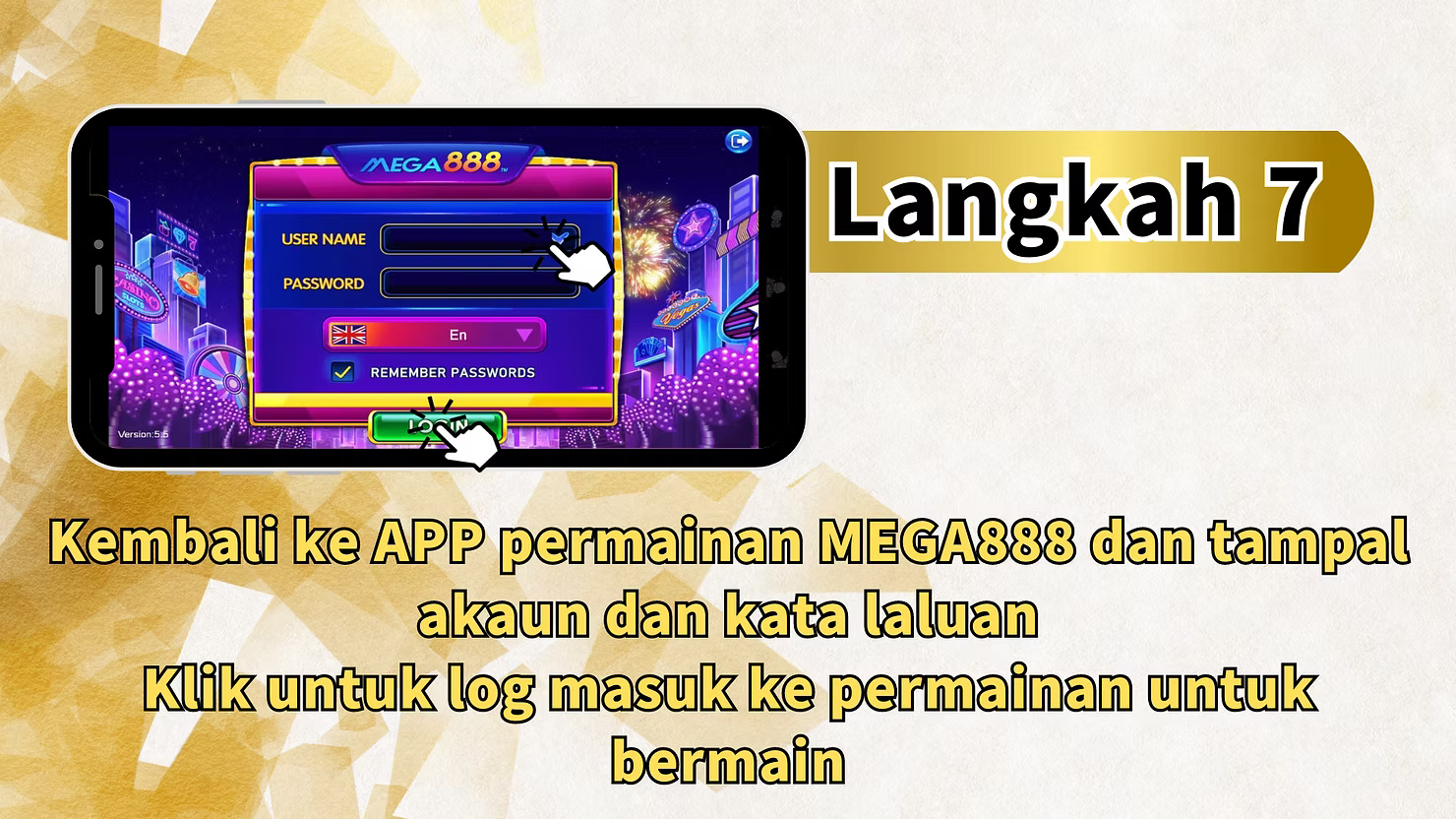
Step 7: Return to MEGA888 App and Login
The final step connects your copied credentials with the installed MEGA888 app:
Return to MEGA888 App
"Return to the MEGA888 game app and paste the account and password" – Switch back to the MEGA888 application you installed earlier.
Paste Credentials
In the MEGA888 app login screen, paste the username and password you copied from LUCKY TOWN PLUS.
Login and Play
"Click to log in to the game to play" – After pasting your credentials, click the login button. You will now have access to all MEGA888 games with your transferred funds ready for play.
Important Notes for MEGA888 on LUCKY TOWN PLUS
Android Only
The MEGA888 download and installation is currently supported for Android devices only. iOS users cannot download the app through this method and should check for alternative access methods or use other available games.
Existing Users
If you already have MEGA888 installed on your device, you do not need to download again. Simply return to the LUCKY TOWN PLUS platform, click the MEGA888 game to get your credentials, and log into your existing app.
Test Accounts Available
New players can use the provided test accounts (test1 to test10000 with password Aa1234) to explore MEGA888 games before depositing real money. This is a great way to familiarize yourself with the platform.
Google Play Protect
Android users may need to disable Google Play Protect temporarily to install the MEGA888 APK. Remember to re-enable it after installation for ongoing device security.
Manual Login Process
Unlike some other games that offer automatic login, MEGA888 requires you to manually copy and paste your credentials. This adds an extra step but ensures you have control over your login information.
Frequently Asked Questions About MEGA888
What Is MEGA888?
MEGA888 is a leading mobile casino platform in Southeast Asia, particularly popular in Malaysia, Singapore, and Thailand. It offers hundreds of slot games, table games, and arcade-style games with high-quality graphics and engaging gameplay.
Is MEGA888 Free to Download?
Yes, the MEGA888 app is free to download. However, playing games requires real money credits from your LUCKY TOWN PLUS account, unless you're using the test accounts provided.
Can I Play MEGA888 on iPhone/iOS?
The current download method supports Android only. iOS users should check with LUCKY TOWN PLUS customer service for alternative access methods or consider playing other available games that support iOS.
Do I Need a Separate MEGA888 Account?
LUCKY TOWN PLUS provides you with a dedicated MEGA888 account when you access the game. You don't need to register separately – your credentials are generated automatically.
How Do Funds Transfer to MEGA888?
Funds are transferred automatically when you access MEGA888 through LUCKY TOWN PLUS. Your LUCKY TOWN PLUS balance and MEGA888 game wallet are integrated seamlessly.
What Are the Test Account Credentials?
Test accounts range from test1 to test10000, all with the same password: Aa1234. These can be used to try games without risking real money.
Why Do I Need to Disable Google Play Protect?
Google Play Protect can sometimes block installations from unknown sources. Disabling it temporarily allows you to install the MEGA888 APK. Always re-enable it after installation for security.
Why Play MEGA888 on LUCKY TOWN PLUS?
LUCKY TOWN PLUS provides the most convenient way to enjoy MEGA888's extensive slot game library. With dedicated account generation, automatic fund transfers, and a simple 7-step setup process, you can start playing within minutes. The availability of test accounts allows new players to explore risk-free, while existing users can seamlessly continue with their preferred games. LUCKY TOWN PLUS's integration eliminates the hassle of separate registrations and manual transfers, letting you focus on what matters most – enjoying the games.
Start Playing MEGA888 on LUCKY TOWN PLUS Today
Ready to enjoy hundreds of exciting slot games? Follow our 7-step guide to download, install, and start playing MEGA888. Android download available, test accounts provided, and automatic fund transfer included. Log in now to LUCKY TOWN PLUS and access MEGA888 – or sign up in minutes using your Malaysia phone number if you're not yet a member.
Play MEGA888 Now