
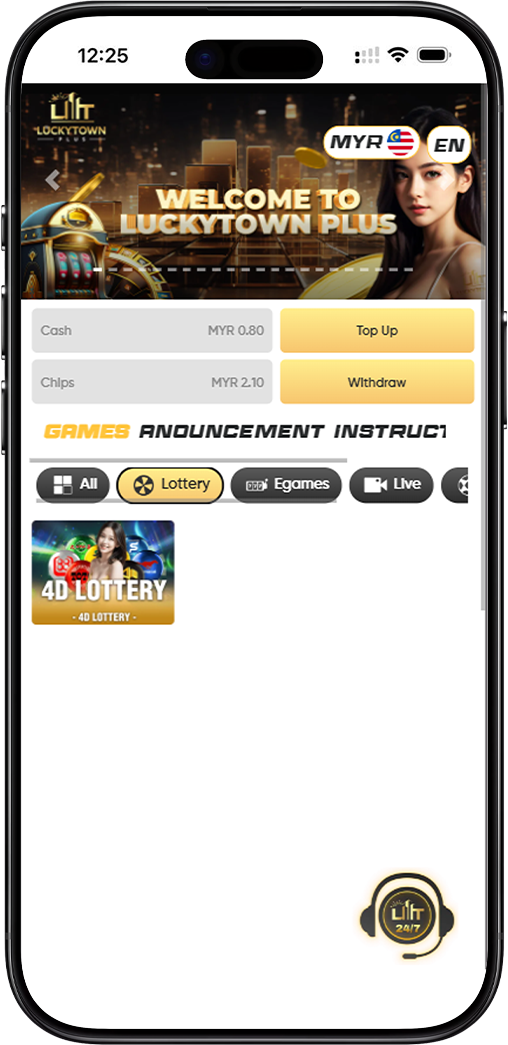
LUCKY TOWN PLUS offers a comprehensive 4D lottery betting platform covering all major Malaysian and regional lottery operators. Whether you're new to lottery betting or an experienced player, this guide will walk you through every step of the process – from selecting your numbers to placing bets and even canceling if needed. LUCKY TOWN PLUS makes lottery betting simple and accessible.
Step-by-Step Guide to Placing 4D Lottery Bets
Step 1: Log In and Access 4D Lottery
Log in to your LUCKY TOWN PLUS account. Once logged in, you can view the lottery odds on this page. Select "4D Lottery" to begin betting on 4D games. Please check the catalog to select the lottery item you wish to bet on and click "4D" .
Step 2: Select Your Betting Date
Choose the draw date for your lottery bet. The system allows you to select multiple dates if you wish to place bets on several upcoming draws at once. This is convenient for players who want to plan ahead.
Step 3: Choose a Betting Platform
Select which lottery platform you want to bet on. Different platforms have different draw schedules and prize structures. Use the platform codes to identify your preferred operator:
Lottery Platform Codes Explained
The platform uses a code system MPTSBKWHE to identify different lottery operators:
- M – Magnum (Malaysia's most established 4D operator)
- P – Da Ma Tai / Damacai (Popular 4D lottery with 1+3D and Jackpot games)
- T – Toto / Sports Toto (4D, 5D, and 6D games)
- S – Singapore Pools (Singapore's legal lottery operator)
- B – Sabah 88 (Regional lottery popular in East Malaysia)
- K – Sandakan STC (Sandakan Turf Club lottery)
- W – Sarawak Da Wan (Sarawak regional lottery)
- H – Grand Dragon (豪龙彩票 / 聚龙彩票)
- E – 9Lotto (Additional lottery option)
Step 4: Enter Your Numbers
In the number field, enter the 4-digit combination you wish to bet on. You can bet on multiple numbers at the same timeby entering them one after another or using the system's multi-bet feature.
Step 5: Enter the Betting Amount
Specify the amount you wish to wager on your selected numbers. The minimum and maximum bet amounts will be displayed based on the platform and your account status.
Step 6: Select Your Purchase Form (Bet Type)
Choose from the following purchase forms (bet types) available for 4D lottery:
Purchase Form Options
- Single – Standard straight bet where you win if your number matches the winning number in exact order
- Return – Bet that covers multiple permutations of your number
- Box – Covers all possible permutations of your selected digits
- i-Box – Combination of straight and box bets
- PH – Special bet type (specific to certain platforms)
Step 7: Select Your 4D Betting Type
For standard 4D bets, you can choose from these betting types:
Standard 4D Betting Types
- B – Covers First prize, Second prize, Third prize, Special prize, and Consolation prize
- S – Covers First prize, Second prize, and Third prize only
- 4A – Covers First Prize only
Step 8: Optional – Select 4D SPECIAL Betting Type
If you choose "4D SPECIAL" , you have additional specialized betting options:
4D SPECIAL Betting Types
- 4A – First prize only
- 4B – Second prize only
- 4C – Third prize only
- 4D – Special prize only
- 4E – Consolation prize only
- 4F – First, Second and Third prizes combined
Step 9: Click "Bet" to Confirm
After selecting all your options – platform, date, numbers, amount, purchase form, and betting type – click the "Bet" button to submit your wager. The system will process your request and display a confirmation message.
Success Confirmation
"The system will show that you have placed a Successful bet." You will see a confirmation receipt with your bet details.
How to Cancel a Lottery Bet
Step 1: Access the Bet List
If you need to cancel a bet you've placed, start by clicking the Three Lines icon in the upper left corner of the screen. This opens the main navigation menu.
Step 2: Select "Bet List"
From the menu, select "Bet List" . This will show you all your active and pending bets.
Step 3: Choose the Date
Select the date of the bet you wish to cancel. The system will display all successful bets from that date.
Step 4: Locate Your Bet Receipt
Find the specific bet you want to cancel. The system will show your receipt with all bet details.
Step 5: Click to Void
"Select click here, click void" – Click on the appropriate option to request cancellation of your bet.
Step 6: Confirm Cancellation
After clicking void, the system will process your request and display a confirmation message:
Cancellation Success
"The system will show your receipt, cancelled successfully." Your bet has now been voided, and your stake will be returned to your account (subject to platform rules and cut-off times).
Important Notes for Lottery Betting
Betting Cut-Off Times
Each lottery platform has specific cut-off times before draws. Ensure you place your bets before the cut-off time for your selected draw date. Late bets cannot be accepted.
Cancellation Window
Bets can only be canceled before the draw cut-off time. Once a draw has closed, bets become final and cannot be voided.
Multiple Bets
You can place multiple bets on the same draw, including betting on different numbers, platforms, or using different bet types. The system supports batch betting for convenience.
Platform Codes Reference
Keep the platform codes handy: M(Magnum), P (Damacai), T (Toto), S(Singapore Pools), B (Sabah 88), K (STC), W (Sarawak Da Wan), H (Grand Dragon), E(9Lotto). These codes help you quickly identify your preferred operator.
Frequently Asked Questions About Lottery Betting
What Is the Difference Between B and S Betting Types?
B covers all prize categories (First, Second, Third, Special, and Consolation), giving you more chances to win. S only covers the top three prizes (First, Second, Third) but typically offers higher payouts on those categories.
What Is a Box Bet?
A Box bet covers all possible permutations of your selected digits. For example, if you bet on 1234 boxed, you win if the winning number is any combination of those four digits (1234, 1243, 1324, etc.).
Can I Cancel a Bet After the Draw?
No. Once a draw has taken place, all bets are final and cannot be canceled. Always check draw times and cancel before cut-off if needed.
How Do I Know If My Bet Was Successful?
After clicking "Bet," the system will display a confirmation message and your bet receipt. You can also check your bet list to see all confirmed bets.
What If I Enter the Wrong Number?
If you realize you've entered the wrong number, you can cancel the bet (before cut-off) and place a new one with the correct number. Follow the cancellation steps above.
Are There Minimum and Maximum Bet Amounts?
Yes. Minimum and maximum bet amounts vary by platform and bet type. These limits will be displayed when you enter your bet amount.
Why Choose LUCKY TOWN PLUS for Lottery Betting?
LUCKY TOWN PLUS offers Malaysian players the most comprehensive lottery betting platform with access to all major operators including Magnum, Damacai, Toto, Singapore Pools, Sabah 88, STC, Grand Dragon, and more. With clear betting instructions, multiple bet types (Single, Return, Box, i-Box, PH), flexible betting options (B, S, 4A, and 4D SPECIAL), and easy cancellation through the Bet List, you have complete control over your lottery experience. LUCKY TOWN PLUS is committed to transparency, security, and player satisfaction.
Start Betting on 4D Lottery at LUCKY TOWN PLUS Today
Ready to try your luck? Follow our step-by-step guide to place your 4D lottery bets. Choose your platform, select your numbers, pick your bet type, and confirm. Log in now to start betting – or sign up in minutes using your Malaysia phone number if you're not yet a member.
Start Lottery Betting Now